Research-backed calculator guide
AI Observability Cost: Traces, Evaluations and Retention
Learn how to estimate AI observability cost from traces, spans, evaluations, seats, retention and storage with a practical workload-based formula.
Quick answer
AI observability cost is the monthly cost of collecting, evaluating, storing and accessing AI application telemetry. Inputs include traces, spans, evaluation coverage, data volume, retention, seats and platform or export fees—not just model tokens.
Use an AI observability cost calculator when you want a fast estimate, but treat the result as a planning model rather than an invoice. Observability vendors meter different units. One may charge by trace, another by processed data or scores, and another by LLM spans, seats or retention tier. A realistic estimate therefore starts with your workload and then applies the rate card for the product and plan you are considering.
The simplest monthly model is:
Estimated monthly observability cost = platform fee + usage fees + seats + retention/storage + evaluation costs + export or infrastructure costs
This guide shows how to calculate each part, reconcile it with a bill, and reduce cost without losing useful debugging signals.
What an AI observability cost calculator measures
An AI observability calculator converts application behavior into billable or operational quantities. Start with the top-level trace count. In OpenTelemetry, a trace is the path of one request through an application, while a span is one unit of work inside that path.[1] For an AI agent, one trace might contain the user request, retrieval, several tool calls, two model calls and a final response. Those child operations become spans.
This distinction matters because “100,000 requests” does not describe the same workload as “100,000 traces with 12 spans each.” A provider that meters traces may see 100,000 units. A provider that meters LLM spans may see a much smaller or larger number depending on what is instrumented. A provider that meters processed data may care more about the size of prompts, outputs, metadata and attachments than the count of requests.
A useful calculator normally asks for these inputs:
- Traces per month: production requests, conversations or agent runs that you send to the observability backend.
- Spans per trace: model calls, retrieval steps, tool calls and meaningful internal operations. Keep the definition consistent with the selected vendor’s meter.
- Evaluation coverage: the share of traces that receive an automated or human score. Include the average number of scores per evaluated trace.
- Payload size: the average input, output and metadata stored per trace or span. Large prompts and tool results can dominate storage.
- Retention: how long event data remains queryable or stored. A longer window can change a plan tier, apply a multiplier or increase infrastructure needs.
- Seats and platform fees: people, workspaces or environments that affect the subscription price.
- Exports and self-hosting: object storage, data transfer, databases, backups and engineering time when telemetry leaves the managed service or runs in your environment.
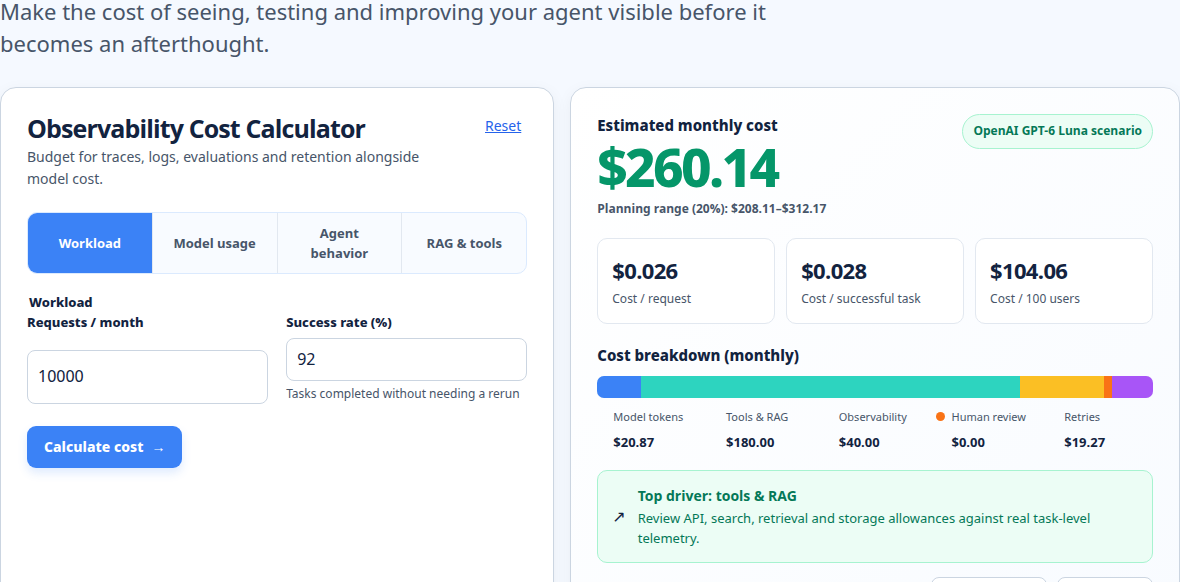
Use observed production numbers when possible. Without telemetry, model low, expected and high cases.
The formula: from workload to monthly cost
First calculate the activity units:
monthly traces = requests or agent runs per month
monthly spans = monthly traces × average spans per trace
monthly evaluated traces = monthly traces × evaluation coverage
monthly scores = monthly evaluated traces × average scores per evaluated trace
Then estimate retained data:
monthly ingest GB = monthly traces × average stored KB per trace ÷ 1,000,000
active retained GB = monthly ingest GB × retention days ÷ 30
The last equation is a planning approximation for steady traffic. Add index, replica and attachment overhead for self-hosted infrastructure. If the vendor meters span payloads, measure average stored KB per span instead.
A flexible cost equation is:
monthly cost = platform fee
             + (trace units × trace rate)
             + (span units × span rate)
             + (score units × score rate)
             + (active retained GB × storage rate)
             + (seats × seat rate)
             + export, network and infrastructure costs
Do not apply every term automatically. Select the terms that exist in the plan you are modeling. Some products bundle traces into processed data. Some include scores or users. Some charge for extended retention only when a trace is upgraded by an evaluator or automation rule. LangSmith’s current documentation, for example, separates all traces from extended-retention upgrades and warns that online evaluators can upgrade retention when configured to do so.[2]
Evaluation cost also needs a clear definition. An evaluation can mean one score attached to a production trace, a batch experiment run, a human annotation, or an LLM judge call whose own model tokens cost money. Count the score or evaluation event according to the vendor’s pricing unit, and separately estimate the judge-model spend with the LLM cost calculator.
Worked example: 120,000 traces per month
Suppose a support agent handles 120,000 production runs each month. Instrumentation creates an average of seven spans per run: one root span, two model calls, two retrieval operations and two tool or orchestration steps. The quality team evaluates 8% of runs, and each evaluated run receives 1.5 scores on average. The team needs 30 days of online retention, has six observability users, and stores 24 KB of trace payload per run after serialization.
The workload becomes:
traces = 120,000 per month
spans = 120,000 × 7 = 840,000 spans per month
evaluated traces = 120,000 × 8% = 9,600 traces
scores = 9,600 × 1.5 = 14,400 scores
monthly ingest = 120,000 × 24 KB ÷ 1,000,000 = 2.88 GB
30-day retained data ≈ 2.88 GB
Now imagine a hypothetical rate card used only to demonstrate the arithmetic, not a current vendor quote: $100 platform fee, $30 per seat, $0.80 per 100,000 traces, $0.50 per 100,000 spans, $1.50 per 1,000 scores and $0.25 per retained GB-month. The estimate is:
platform                         $100.00
traces: 120,000 × $0.80/100,000     $0.96
spans: 840,000 × $0.50/100,000      $4.20
scores: 14,400 × $1.50/1,000       $21.60
seats: 6 × $30                     $180.00
storage: 2.88 × $0.25               $0.72
illustrative monthly total         $307.48
The lesson matters more than the total: under this rate card, seats and evaluation volume matter more than raw ingestion. At 90-day retention, retained data is approximately 8.64 GB and storage becomes $2.16 before any plan-level change. Another vendor’s meter could produce a different answer.
For a real estimate, replace each illustrative rate with a published plan rate, quote or internal infrastructure cost, and record its unit and date checked.
Assumptions and exclusions
A calculator result is only as good as its boundary. This estimate assumes all 120,000 runs are sent, seven spans is a stable average, 24 KB is the stored trace payload, and 8% evaluation coverage applies to traces rather than spans.
Usually include:
- production and staging telemetry if both environments are billed;
- retries, tool calls and parallel branches that create additional spans;
- automated judge-model tokens and human review time;
- indexed fields, attachments and media if the plan stores them;
- backups, object storage, egress and database capacity for a self-hosted deployment;
- seats, workspaces, environments and minimum plan commitments.
Usually exclude from a basic estimate:
- the underlying LLM inference bill, unless you add it separately;
- application hosting, vector database and search costs;
- the engineering cost of instrumenting, operating and responding to alerts;
- tax, negotiated discounts and enterprise support unless documented;
- the value of developer time saved by faster debugging.
Keep observability beside model spend. The agent cost calculator estimates multi-call execution; this model covers recording and evaluation.
Common mistakes that distort LLM monitoring cost
Counting requests but not spans
A multi-step agent can generate many child spans for one user request. If your plan meters spans or processed data, request volume alone understates cost. Measure the p50 and p95 span count as well as the average; long-tail workflows can drive ingestion bursts.
Treating evaluation coverage as free
An online evaluator may create a score, retain the source trace longer, and call another model. LangSmith documents retention auto-upgrades for some online evaluators and automation rules.[2] Other systems meter scores or processed data. Model the evaluator’s score count and judge tokens separately.
Confusing data access with deletion
A plan may restrict how far back users can query without immediately deleting the underlying event data. Langfuse distinguishes a data access window from a retention policy, and its project retention can delete traces, observations, scores and media while leaving audit logs and dataset items unaffected.[3] Ask which records are deleted, when cleanup occurs, and whether exports are your responsibility.
Using total tokens without cache detail
Token usage is not always one input bucket plus one output bucket. Datadog’s documentation notes that input can include non-cached, cache-read and cache-write tokens, with different pricing implications.[4] If your instrumentation reports only aggregate input tokens, your estimate may be wrong when prompt caching is active.
Comparing prices with different units
A monthly platform fee, per-seat fee, per-score fee and per-GB fee cannot be compared until you normalize them to the same workload. Do not call one product cheaper because its advertised unit rate is lower. First map every plan to traces, spans, scores, retained GB, users and retention days.
Forgetting payload growth
Tool outputs, retrieved documents, images and verbose metadata can increase stored bytes without increasing trace count. Sample actual serialized payloads and remove sensitive or unnecessary fields before they enter the backend.
Practical optimization and reconciliation steps
Start with the highest-cost driver in your own estimate. If seats dominate, reduce unused seats or separate read-only access from editor access where the plan allows it. If spans dominate, keep root traces and high-value model, retrieval and tool spans, but avoid instrumenting every trivial helper function. OpenTelemetry describes spans as units of work, so use that boundary to preserve useful causal detail rather than blindly recording every function call.[1]
If evaluation or judge calls dominate, use stratified sampling. Score critical routes fully and sample routine traffic by tier, model version, error status or release. Keep a fixed regression holdout set so lower sampling does not hide drift.
Set retention by purpose. Keep recent production traces for incident investigation, retain a smaller evaluated sample for quality analysis, and export compliance evidence when appropriate. Check whether evaluators or automation silently change the tier. For self-hosted systems, configure lifecycle policies and verify deletion.
Reconcile the estimate every month using four comparisons: application request count versus trace count, expected spans versus received spans, expected evaluation events versus billed scores, and estimated retained GB versus the provider’s usage report. Investigate gaps caused by retries, duplicate updates, sampling, dropped telemetry, asynchronous cleanup or indexing overhead. The invoice reconciliation guide can help you turn that variance into a repeatable review.
Keep a dated assumptions sheet with plan name, retention tier, unit definitions, traffic sample, payload size and exclusions. See the cost methodology. When a meter changes, update assumptions and rerun low, expected and high cases.
Run your scenario
Turn this framework into an editable estimate.
Use dated, source-linked assumptions and see cost per request, successful task and month.
FAQ
What is included in AI observability cost?
It can include a platform fee, trace or span ingestion, processed data, scores, judge-model tokens, seats, retained storage, exports, network transfer and self-hosting. Map the workload to the plan’s billing units before comparing totals.
Is LLM observability priced by tokens?
Sometimes, but not always. Tokens estimate the model bill and cost attached to an LLM call. Observability platforms may instead charge by traces, spans, data, scores, seats or retention. Use the LLM cost calculator for model tokens, then add observability.
How much does retention change monitoring cost?
It depends on the billing model. Longer retention may increase stored GB, move traces into an extended tier, or require a higher plan. It can also increase self-hosted database and backup capacity. Calculate monthly ingest × retention days ÷ 30, then verify tier rules.
Should every AI request be traced?
Trace every request when reliability, security or debugging requires it, but do not assume every internal operation must be a full, high-cardinality span. Preserve the root trace and the operations that explain model behavior, retrieval, tools, latency, errors and cost. Use sampling only when it is documented and still supports your incident and evaluation goals.
How can I compare two observability vendors fairly?
Give both vendors the same trace volume, span distribution, score coverage, payload size, retention, seats and environment mix. Normalize allowances and overage units to one month, including judge-model spend, exports, support and self-hosting. Never compare a span rate with a trace rate without translating the workload.
Related tools
Use the observability cost calculator for this scenario. Pair it with the agent cost calculator, LLM cost calculator, invoice reconciliation, and methodology.
About the Author
About the Author: Zunair Ali Syed is a doctoral researcher in Management Sciences at Minhaj University Lahore and a research consultant with experience in academic research and editing since 2011. He runs QuickEduHelp, with professional interests in digital learning, research methods, and evidence-based academic support.
Primary sources checked
Pricing and product behavior can change. These sources support the time-sensitive claims in this guide; verify current provider terms before committing spend.