Research-backed calculator guide
AI API Invoice Reconciliation: From Estimate to Actual Spend
Learn how to reconcile an AI API estimate with provider usage exports, invoice line items, credits, taxes, retries, tools, and actual spend—with a worked example and practical checklist.
Quick answer
AI API invoice reconciliation is the process of proving that your planned cost, internal usage ledger, provider export, credits, taxes, and invoice total describe the same period and the same billable units. The fastest reliable method is to:
- Lock the billing period and timezone.
- Export provider usage and cost data for the same organization, project, and dates.
- Normalize model, input, output, cached, tool, image, audio, and other units.
- Recalculate expected cost from the dated rate card.
- Match the result to the invoice after credits, tax, refunds, and adjustments.
- Explain the remaining variance by owner, cause, and next action.
The goal is not to make the estimate equal the invoice by changing assumptions after the fact. The goal is to show why actual spend moved and which assumption should change for the next estimate.
OpenAI’s current guidance separates dashboard activity from individual API-response usage and notes that dashboard data is displayed in UTC.[1] Its monthly export workflow supports activity or cost CSVs and recommends grouping cost data by line item when reconciling a calendar-month invoice.[2] Those details matter because a correct formula can still produce a wrong reconciliation if its period or filter does not match the bill.
Run your scenario
Turn this framework into an editable estimate.
Use dated, source-linked assumptions and see cost per request, successful task and month.
What the calculator measures
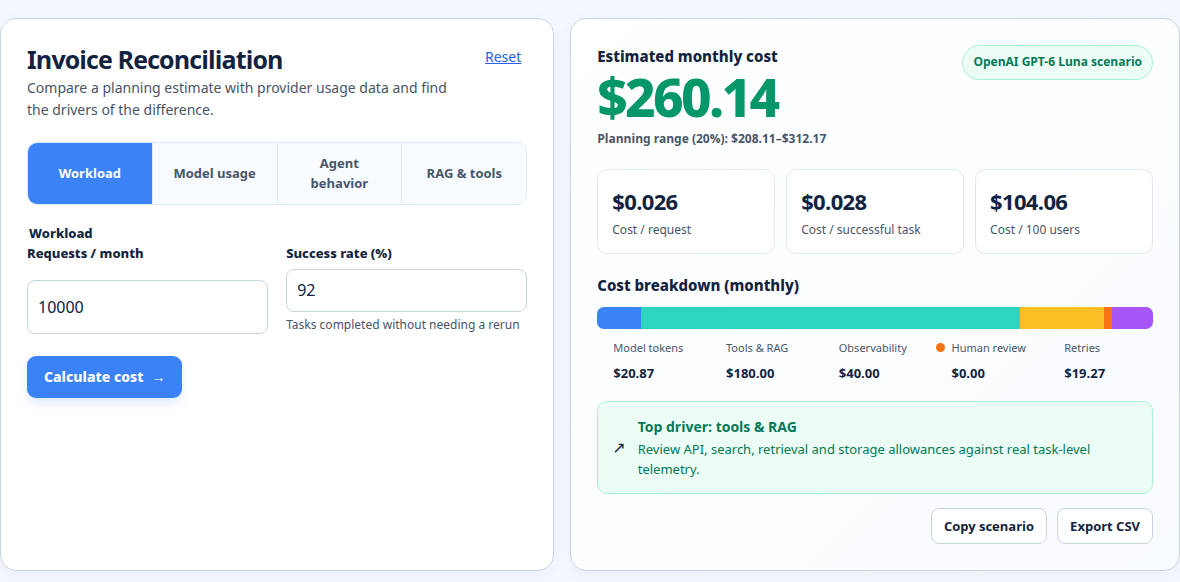
The AI API invoice reconciliation calculator compares an estimate with actual spend instead of pretending that a token price alone explains a bill. It is designed to surface the drivers that usually create the gap:
- estimated and actual requests, tasks, or successful outcomes;
- input, output, and cached-input units;
- model or provider rates and their effective date;
- retries, extra agent steps, and failed or repeated work;
- tool, web, RAG, storage, observability, and human-review charges;
- credits, taxes, refunds, committed-use adjustments, and currency treatment; and
- variance in dollars, percentage, cost per request, and cost per successful task.
It measures a planning and review model, not a replacement for the provider’s invoice. Provider exports remain the source of record for billed usage. The calculator makes the comparison legible: it shows whether the gap came from volume, behavior, pricing, allocation, or items outside the modeled scope.
This is different from the agent cost calculator, which is best for forecasting a workload before the invoice exists. If the question is “what will this agent cost at 50,000 tasks?”, start there. If the question is “why did this month’s bill exceed the forecast?”, use reconciliation.
The reconciliation formula
A useful top-level formula is:
actual_total = provider_usage_cost
             + tool_and_service_cost
             + taxes_and_fees
             - credits_and_refunds
             +/- approved_adjustments
To recalculate the usage portion, split each unit by its rate rather than applying one blended token price:
usage_cost = (input_units / 1,000,000 × input_rate)
           + (cached_input_units / 1,000,000 × cached_input_rate)
           + (output_units / 1,000,000 × output_rate)
           + other_billable_units
For a planning estimate, add behavior multipliers explicitly:
estimated_calls = tasks × steps_per_task × (1 + retry_rate)
forecast_total = usage_cost
               + (tasks × tool_cost_per_task)
               + (tasks × observability_cost_per_task)
               + human_review_cost
Do not bury retries or extra steps inside an unexplained “contingency.” Keeping them visible lets you compare the forecast with the actual request count and identify an engineering problem rather than labeling it forecast error.
Worked example: estimate versus actual
Assume a support agent is planned for 40,000 tasks. The estimate uses three model steps per task, 2,000 input tokens per step, 500 output tokens per step, and 35% cached input. For illustration, the dated rate card is $2 per million uncached input tokens, $0.20 per million cached input tokens, and $8 per million output tokens. Tool cost is $0.015 per task and observability is $0.003 per task.
The estimate is:
calls = 40,000 × 3 = 120,000
input = 120,000 × 2,000 = 240,000,000 tokens
output = 120,000 × 500 = 60,000,000 tokens
cached input = 240,000,000 × 35% = 84,000,000 tokens
uncached input = 156,000,000 tokens

model = (156 × $2) + (84 × $0.20) + (60 × $8) = $808.80
tools = 40,000 × $0.015 = $600.00
observability = 40,000 × $0.003 = $120.00
estimated total = $1,528.80
At month-end, the usage export shows 42,500 tasks, 3.10 average model steps per task, 275 million input tokens, 75 million cached input tokens, and 68 million output tokens. The provider’s usage subtotal is recalculated as $959.00. Tools total $637.50 and observability totals $123.60.
actual pre-tax total = $959.00 + $637.50 + $123.60 = $1,720.10
variance = $1,720.10 - $1,528.80 = $191.30
variance rate = $191.30 / $1,528.80 = 12.5%
The answer is not simply “usage was higher.” The evidence shows several drivers: task volume rose by 6.25%, average steps increased, output tokens increased, and cache coverage fell from the planned 35% to about 27.3% (75 million of 275 million input tokens). Output growth and the lower cache share explain more of the model variance than task count alone.
If the invoice also contains $86.00 of tax and a $25.00 provider credit, the payable amount is:
invoice_total = $1,720.10 + $86.00 - $25.00 = $1,781.10That amount should be compared with the invoice total, while $1,720.10 should be compared with the usage-cost export. Mixing the two comparisons is a common source of false exceptions.
Practical AI API usage cost reconciliation steps
1. Freeze the period and scope
Record the start and end timestamps, timezone, organization, project, account, currency, and whether the report is calendar-month, month-to-date, or a custom window. OpenAI’s dashboard uses UTC and its reconciliation guidance warns that multiple organizations can have separate or consolidated invoices depending on the invoicing setup.[1][2]
2. Export both activity and cost where available
Use activity data when you need request, model, key, user, or workload detail. Use cost data when you need invoice-like line items. Keep the raw export unchanged, then create a normalized working copy with columns such as period, provider, project, model, unit_type, units, rate, cost, workload, and cost_center.
Provider reporting differs. Anthropic’s Usage and Cost Admin API supports grouping by model, workspace, service tier, and API key, and separates uncached input, cached input, cache creation, and output tokens.[5] Google’s Gemini documentation provides a Usage dashboard and distinguishes prepay and postpay behavior, including processing latency that can allow overages on long-running work.[6] Treat these as provider-specific controls, not universal assumptions.
3. Reconcile units before dollars
Check model IDs, unit labels, service tier, routing region, cache category, batch mode, and rate effective date before checking the total. AWS specifically warns that Bedrock cost reports separate input, output, cache-read, and cache-write tokens, and that routing or service tier can affect the usage type and rate.[7]
4. Join provider records to your internal ledger
Your ledger should retain a request or job ID, timestamp, provider, model, environment, workload, input and output units, cache units, retry count, status, tool calls, and cost center. A provider export may not contain your product’s tenant or feature name, so preserve those tags at request time. If you cannot join a material charge to a workload, classify it as an attribution exception rather than forcing it into the nearest team.
5. Match credits, tax, and payments separately
A prepaid recharge proves that funds entered an account; it does not prove which workload used them. Match payment reference, currency, balance movement, credits, refunds, tax, and invoice number in separate fields. Keep usage cost, payable invoice total, and cash movement as three related but distinct reconciliations.
6. Explain and close the variance
Set a tolerance appropriate to your controls, then create an exception row for each material gap. Give it a cause such as volume, retry behavior, cache miss, model mix, pricing change, period cutoff, tax, credit, or missing allocation. Assign an owner and record the corrective action, such as a retry cap, a cache instrumentation fix, or a new project tag.
Assumptions and exclusions
The calculator assumes that you can provide comparable estimate and actual periods, that rates are tied to a source and effective date, and that usage units are not silently mixed. It can model common AI workload drivers, but it does not retrieve private provider invoices, infer undocumented contract rates, determine tax liability, or guarantee that a provider export is complete.
It excludes costs you do not enter, including reserved capacity, enterprise commitments, support plans, infrastructure outside the modeled workflow, foreign-exchange spread, card fees, and untagged human work. It also cannot decide whether a failed request is billable under a provider’s current policy. Verify that rule in the provider’s documentation or invoice terms before classifying failures.
Use the methodology page for the calculator’s assumptions and source-handling approach. For current rate records, use the model pricing comparison rather than copying a stale price table into a spreadsheet.
Common mistakes
Comparing different periods
A dashboard may be month-to-date while the invoice covers a closed calendar month. Batch jobs, delayed exports, and timezone boundaries can move activity across the apparent cutoff.
Using one blended token rate
Input, output, cached input, cache writes, audio, images, tools, and batch processing can have different units or rates. A blended rate hides the exact driver of a variance.
Ignoring retries and agent loops
A forecast based on successful tasks can miss repeated calls after timeouts, invalid structured output, or incomplete tool results. Compare request count and retry count, not only completed-task count.
Treating credits as negative usage
Credits reduce payable amount; they do not erase the usage event. Keep them visible so finance can distinguish consumption from an adjustment.
Replacing the provider export with application logs
Logs are essential for attribution, but they may omit provider-side rounding, cache categories, taxes, refunds, or account-level charges. Use logs to explain the export, not to override it without evidence.
Changing assumptions until the numbers match
A good reconciliation preserves the original estimate, records the actual result, and adds a variance explanation. Never overwrite last month’s assumptions just to make the forecast look accurate.
Optimization after reconciliation
Reconciliation is most valuable when it produces a small operational change. If output tokens dominate, set output limits and test shorter response formats. If cache coverage is below plan, stabilize reusable prompt prefixes and measure cache reads separately. If retries dominate, add exponential backoff, idempotency keys, and a retry budget per task. If tools or RAG dominate, cache safe lookups, remove duplicate retrieval, and measure cost per successful task rather than cost per call.
Use the observability cost calculator when tracing, logs, evaluations, or retention were omitted from the forecast. Re-run the estimate after changing one driver at a time. That creates a clean before-and-after comparison instead of attributing every saving to a model switch.
FAQ
What is AI API invoice reconciliation?
It is the process of matching provider usage, internal workload records, pricing units, credits, taxes, payments, and invoice totals for the same period.
What should an AI API usage ledger contain?
At minimum, keep timestamp, request or job ID, provider, model, project, workload, environment, input and output units, cached units, status, retries, tool usage, cost center, and calculated cost.
Why does an OpenAI API billing export not match my estimate?
Check the UTC period, organization and project filters, model mix, output tokens, cached-input share, retries, tools, credits, and invoice tax. Also confirm that the export is activity or cost data appropriate to the comparison.
Should credits be included in usage cost?
Show them separately. Compare the provider usage subtotal with modeled usage cost, then reconcile credits, tax, refunds, and other adjustments to the payable invoice total.
How often should teams reconcile AI API spend?
Review usage weekly for anomalies and perform a formal reconciliation at each invoice close. High-volume or prepaid workloads may need daily balance and export checks.
Related internal tools
Start with the agent cost calculator for a forward-looking estimate, use the observability cost calculator for monitoring overhead, review dated rates in the model pricing comparison, and document boundaries in the methodology. The invoice reconciliation calculator brings those estimate drivers into an actual-versus-expected review.
About the Author
About the Author: Zunair Ali Syed is a doctoral researcher in Management Sciences at Minhaj University Lahore and a research consultant with experience in academic research and editing since 2011. He runs QuickEduHelp, with professional interests in digital learning, research methods, and evidence-based academic support.
Primary sources checked
Pricing and product behavior can change. These sources support the time-sensitive claims in this guide; verify current provider terms before committing spend.