Research-backed calculator guide
Model Pricing Comparison: How to Compare AI API Costs Fairly
Learn how to perform an AI model pricing comparison using the same workload, token units, caching assumptions, and total-cost formula across providers.
Quick answer
The fairest AI model pricing comparison uses one representative workload for every model, separates input tokens from output tokens, and applies each provider’s current price per million tokens to the correct volume. Do not compare only the headline input rate. A model with cheap input can still be expensive if it generates long answers, bills reasoning tokens, charges for cache writes, or adds tool and regional fees.
Use this basic calculation:
Estimated cost = (input tokens ÷ 1,000,000 × input rate) + (output tokens ÷ 1,000,000 × output rate) + cache, reasoning, tool, storage, and other applicable charges.
The “cheapest AI API” is therefore workload-dependent. For a short classification prompt, input price may dominate. For a reasoning agent, output and hidden thinking tokens may dominate. For a long-running support assistant, repeated conversation history makes caching and token growth important.
What the calculator measures
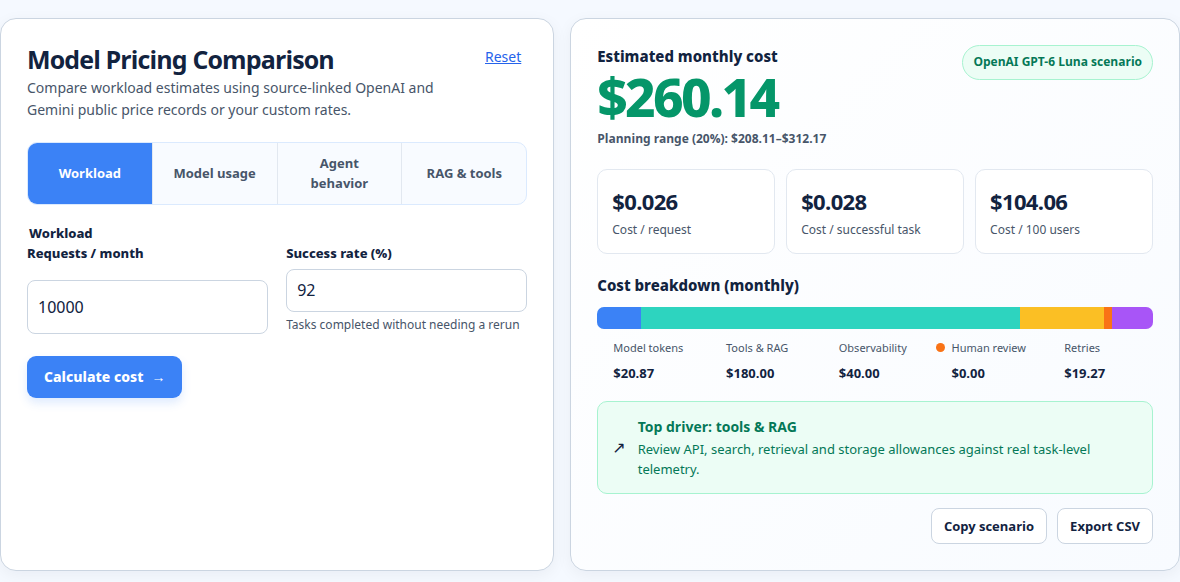
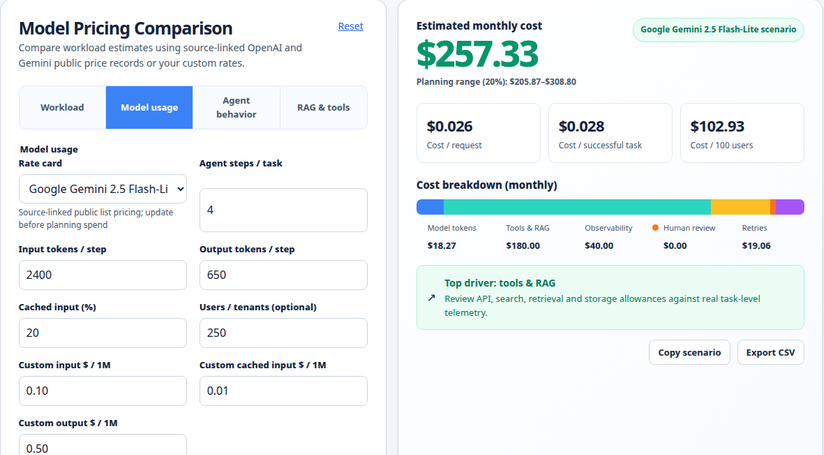
The AI model pricing comparison calculator is designed to put models on the same arithmetic baseline. You provide the number of input tokens, output tokens, and requests or calls, then compare the resulting spend under the selected model rates. This makes the result a planning estimate, not an invoice prediction.
A useful comparison separates at least these variables:
- Input tokens: system instructions, user prompts, retrieved context, conversation history, tool definitions, and other content sent to the model.
- Output tokens: the visible answer or generated completion. Some reasoning models also report thinking or reasoning tokens that can be billed separately or included in output pricing.
- Request volume: the number of calls in the period. A per-call estimate becomes a daily, monthly, or annual estimate only after multiplying by realistic traffic.
- Caching: fresh input, cache writes, and cache reads can have different rates. A cache hit is not the same as free input.
- Extras: tool calls, web search, grounding, image/audio/video tokens, storage, regional processing, minimums, and platform fees may sit outside the simple text-token calculation.
For a broader scenario estimate, use the LLM cost calculator. If you already have measured token counts from provider usage metadata, the AI token cost calculator is a better reconciliation step. Agent workflows should be modeled with the agent cost calculator, because one user action can trigger several model calls and tools.
How to compare AI API prices fairly
1. Define the workload before looking at prices
Write down what one unit of work means. For example, one customer-support turn might include a 1,500-token system prompt, 2,000 tokens of conversation history, 500 tokens of retrieved policy text, and a 300-token answer. A document extraction job might have 30,000 input tokens and a 1,000-token structured response.
Then specify the period: per request, per 1,000 requests, per day, or per month. Avoid comparing one provider per message with another provider per million tokens. Normalize the unit first.
2. Keep input and output separate
Providers publish input and output rates independently because the model does different work in each direction. Output is often more expensive, so a model that looks costly on input may be competitive when it produces concise answers. Conversely, a low input rate can hide a large bill when prompts are paired with long completions.
The current OpenAI pricing documentation lists prices per 1 million tokens and separates input, output, cached input, and cache-write rates.[1] Anthropic’s pricing documentation likewise separates base input, cache writes, cache hits, and output.[2] Gemini’s pricing documentation identifies input, output, context caching, and in some cases thinking-token treatment.[3]
3. Use model IDs and pricing dates, not family names alone
“Fast,” “mini,” “pro,” and “latest” are not comparable billing units. Record the exact model ID, provider endpoint, currency, processing tier, and date checked. A model alias can change over time, and a preview model may have a different rate or availability from its predecessor.
A comparison should also note whether rates are standard, batch, flex, priority, or regional. For example, OpenAI lists separate service modes and regional-processing adjustments.[1] Google lists different tiers and scheduled price changes for some models.[3] Treat a promotional or batch rate as a separate scenario, not as the default rate.
Formula and assumptions
For a standard text-only request with no caching, the core formula is:
input_cost  = input_tokens  / 1,000,000 × input_price_per_M_tokens
output_cost = output_tokens / 1,000,000 × output_price_per_M_tokens
request_cost = input_cost + output_cost
period_cost = request_cost × number_of_requests
If cached input is involved, split the input volume instead of applying one blended rate:
input_cost = (fresh_input_tokens × fresh_rate
             + cached_input_tokens × cache_read_rate
             + cache_write_tokens × cache_write_rate) / 1,000,000
Add reasoning, tool, media, storage, or search charges only when the provider bills them separately. Keep the units explicit. “$2” is not meaningful until you know whether it means $2 per million input tokens, per thousand tool calls, per minute, or per session.
These formulas assume that the token counts are actual provider-reported counts or a model-specific estimate. Tokenizers differ. Anthropic notes that the same text can produce different token counts by model and tokenizer.[2] Google also explains that text, images, audio, video, system instructions, and tools can all contribute to token usage.[4] A word-count shortcut is useful for a rough budget, but it should not replace measured usage for production planning.
Worked example: one workload, three public rates
Suppose an application makes 1,000,000 uncached input tokens and 250,000 output tokens during a billing period. Assume standard synchronous text requests, no batch discount, no tools, no media, no regional uplift, and no taxes or credits. The calculation is deliberately simple so that the comparison can be audited.
Using rates shown in the first-party documentation checked on October 28, 2026:
| Model example | Input rate | Output rate | Calculation | Estimated token cost |
|---|---|---|---|---|
| OpenAI GPT-6 Luna | $0.10 / 1M | $0.50 / 1M | 1.0 × $0.10 + 0.25 × $0.50 | $0.225 |
| Google Gemini 2.5 Flash-Lite | $0.10 / 1M | $0.40 / 1M | 1.0 × $0.10 + 0.25 × $0.40 | $0.200 |
| Anthropic Claude Sonnet 5.5 | $2.00 / 1M | $10.00 / 1M | 1.0 × $2.00 + 0.25 × $10.00 | $4.500 |
The arithmetic suggests that Gemini 2.5 Flash-Lite is the lowest-cost option for this exact token mix, followed by GPT-6 Luna. It does not prove that either model is the best choice. The models differ in capability, latency, context behavior, output quality, rate limits, availability, and tooling. A fair decision tests the same prompts and acceptance criteria, then weighs quality-adjusted cost.
If the same 1,000,000 input tokens were mostly repeated context, the result could change. A cache hit rate, cache-write premium, and cache lifetime would need to be modeled for each provider. If an agent performs five model calls per user task, multiply each call’s measured token profile rather than treating the task as one prompt.
Why the lowest token rate may not be the lowest total cost
A low list price can be offset by extra tokens. Long system prompts, duplicated conversation history, verbose JSON, retrieved documents, and tool schemas all increase the input side. A model that needs more instructions or more retries can cost more even when its published rate is lower.
Reasoning models need special care. Google’s pricing documentation states that output pricing can include thinking tokens for listed models.[3] Google’s usage documentation exposes separate thought, cached, tool-use, input, and output fields, depending on the API surface.[4] If your estimator counts only visible answer tokens, it may understate spend.
Caching is another source of false savings. Anthropic documents 5-minute and 1-hour cache-write multipliers and lower cache-read rates, with model-specific exceptions.[2] OpenAI lists cached input and cache-write prices separately.[1] Google lists context caching and storage charges for applicable models.[3] Compare the same cache policy across providers: fresh prompt, write cost, number of reads, expiration window, and storage duration.
Quality and operational cost matter too. A cheaper model that fails extraction validation, requires a second call, or causes human review may have a higher cost per successful result. Add retry rate, fallback rate, latency requirements, and evaluation pass rate to the business model after the token calculation.
Assumptions and exclusions to state beside every estimate
A useful estimate says what it leaves out. State whether the numbers include:
- input and output tokens only, or reasoning/thinking tokens as well;
- fresh input, cached input, cache writes, and cache storage;
- tool calls, web search, grounding, file search, code execution, or containers;
- text only, or image, audio, and video processing;
- standard, batch, flex, priority, or regional processing;
- retries, safety refusals, fallbacks, and multi-step agent loops;
- provider credits, free tiers, taxes, currency conversion, and reseller markups.
The OpenAI documentation, for example, says built-in tool tokens are billed at the selected model’s rates and lists separate tool pricing in some cases.[1] Gemini documentation says multimodal content is tokenized and that usage metadata can include tool-use and cached tokens.[4] These are reasons to label a calculator result as an estimate rather than a guaranteed invoice amount.
Common mistakes in an LLM pricing comparison
Comparing input price only
Input-only rankings favor prompts with little output. Include a realistic output-to-input ratio. For chat, use observed conversation turns. For summarization, include the expected summary length. For code generation, include retries and test-fix iterations.
Treating tokens as words
The same text can tokenize differently by language, model, formatting, and modality. Use the provider’s count-token endpoint or the usage object returned with a real request. Google recommends counting input before a request and inspecting response usage afterward.[4]
Mixing model tiers and capabilities
Do not call a flagship model “expensive” and a small model “cheap” without recording the quality requirement. Compare candidates that can pass the same test set, or report price and quality as separate dimensions.
Ignoring conversation history
In a chat loop, every turn may resend previous messages unless the API or application handles state differently. Estimate tokens per turn, not just tokens in the newest user message. Include system prompts, tool definitions, and retrieved context.
Using a stale price sheet
Pricing changes, models retire, and promotional rates expire. Put the checked date and exact model ID in the estimate. Recheck official pricing before a procurement decision or launch.
Calling one model the universal cheapest AI API
“Cheapest” depends on token mix, cache behavior, modality, throughput, and success rate. Say “lowest estimated cost for this workload and these assumptions” instead.
Practical optimization and reconciliation steps
Start with measurement. Export provider usage by model and date, then group input, output, cached, reasoning, and tool tokens separately. Compare the observed totals with the calculator’s assumptions. If the estimate is low, look first for duplicated history, hidden tool schemas, long outputs, retries, or a model alias that resolved differently than expected.
Next, reduce tokens without reducing task quality. Trim repeated instructions, move stable context into a cache where the provider’s economics support it, retrieve only relevant passages, cap unnecessary output, and request compact structured data. For multi-step agents, log every model call with a parent task ID so that a single user action cannot hide a chain of small charges.
Then test quality-adjusted cost. Run a fixed evaluation set across the shortlisted models. Record pass rate, average tokens, retries, latency, and cost per successful result. A simple decision metric is:
cost per successful result = total API spend / accepted resultsFinally, reconcile monthly. Compare billed spend with the sum of usage events, allowing for rounding, credits, taxes, and provider-specific line items. Keep a versioned rate card so that a future change can be explained instead of silently altering historical estimates. The methodology page provides a useful place to document these conventions.
Run your scenario
Turn this framework into an editable estimate.
Use dated, source-linked assumptions and see cost per request, successful task and month.
FAQ
What is the fairest way to compare AI model prices?
Use the same workload, exact model IDs, current first-party rates, and separate input, output, cached, reasoning, tool, and media charges. Report the assumptions and compare quality on the same evaluation set.
Is the cheapest AI API always the best option?
No. A lower token rate can be offset by more output, retries, weaker task accuracy, slower responses, missing features, or higher operational work. Choose the lowest cost per successful result that meets your requirements.
How do I calculate an LLM API cost from tokens?
Divide each token category by 1,000,000, multiply by that category’s published rate, add applicable charges, and multiply by the number of requests. Keep cached input separate from fresh input.
Should reasoning tokens be included in a model pricing comparison?
Yes, when the provider bills them or reports them as part of priced output. If the provider includes them in output pricing, document that treatment. If the API exposes a separate reasoning field, include it in the model-specific calculation.
How accurate is a token cost calculator?
It is as accurate as its token counts and rate card. Estimates based on guessed words are directional. Production reconciliation should use provider usage metadata, including system instructions, tool calls, cached tokens, and multimodal usage where applicable.
How often should I update AI API price comparisons?
Update the rate card when a provider changes a model, price, tier, cache policy, or billing unit. At minimum, show the date checked and verify official documentation before committing to a long-term forecast.
Related tools
Use the AI model pricing comparison for side-by-side model estimates, the LLM cost calculator for scenario planning, and the AI token cost calculator for measured token volumes. If your workflow chains calls, tools, and retries, use the agent cost calculator instead of multiplying one chat estimate. Review the methodology page when you need to document assumptions for a budget or procurement review.
About the Author
About the Author: Zunair Ali Syed is a doctoral researcher in Management Sciences at Minhaj University Lahore and a research consultant with experience in academic research and editing since 2011. He runs QuickEduHelp, with professional interests in digital learning, research methods, and evidence-based academic support.
Primary sources checked
Pricing and product behavior can change. These sources support the time-sensitive claims in this guide; verify current provider terms before committing spend.