Research-backed calculator guide
How Much Does OpenAI API Cost per Month?
Learn how to estimate OpenAI API cost per month from requests, input and output tokens, model rates, caching, Batch usage, and real usage data.
Quick answer
There is no single monthly OpenAI API price. You pay for the tokens and services your application uses, so the answer depends on your model, request volume, input tokens, output tokens, cached tokens, and any separately priced tools.
For a basic text workload, use this estimate:
Monthly cost = (monthly input tokens ÷ 1,000,000 × input rate)
              + (monthly output tokens ÷ 1,000,000 × output rate)
              + tool, storage, or other usage charges
For example, 100,000 monthly requests averaging 1,500 input tokens and 500 output tokens on gpt-6.1-sol produce 150 million input tokens and 50 million output tokens. Using standard rates of $2 per million input tokens and $10 per million output tokens, the estimated monthly cost is $800 before caching, Batch discount, tools, credits, taxes, or account-level adjustments. OpenAI lists rates by model and billing mode in its [pricing documentation][1], so treat any example as dated, not permanent.
If you want to test your own numbers, start with the OpenAI API pricing calculator. It is faster and safer than multiplying a single “cost per request” by a guessed number of users.
What the calculator measures
An OpenAI API cost calculator is a planning model. It converts a workload into billable units and applies the selected model’s rate card. The main inputs are:
- Model: The input, output, cached-input, audio, image, or other rate depends on the model and modality.
- Monthly requests: Count API calls, not just end-user actions. One user action can create several model calls, tool calls, retries, or agent steps.
- Average input tokens per request: Include the system or developer instructions, conversation history, retrieved context, tool definitions, and user message that actually reach the model.
- Average output tokens per request: Use reported output tokens where possible. Visible words are not always the complete billed output.
- Processing mode: Standard and Batch can have different rates. Batch is useful only when a delayed result is acceptable.
- Cached input: A repeated prompt prefix may qualify for the model’s lower cached-input rate, but caching depends on a matching prefix and model-specific rules.
The calculator therefore answers, “What would this assumed workload cost at this rate?” It does not promise that an invoice will match the first estimate. OpenAI’s token-counting endpoint can count the same kind of input you send to the Responses API, including messages, images, files, tools, and conversations. It also includes formatting tokens that are easy to miss in a local estimate.[2]
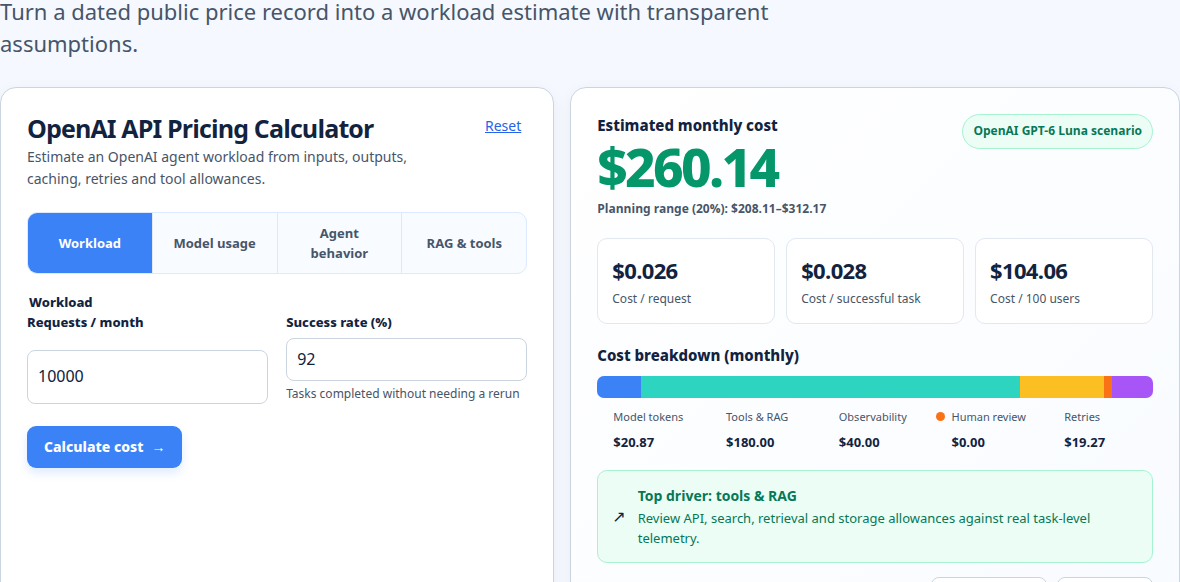
The distinction matters because a chatbot request is rarely just the text typed into a box. It may include instructions, conversation history, retrieved documents, function schemas, an image, or a previous tool result. Those components can increase the input count even when the user’s message stays short.
The formula for OpenAI API cost per month
Start by converting request-level averages into monthly token totals:
Monthly input tokens  = requests per month × average input tokens per request
Monthly output tokens = requests per month × average output tokens per request
Then apply the model’s rates, which are normally published per one million tokens:
Standard monthly cost =
  (monthly input tokens ÷ 1,000,000 × input price per 1M)
+ (monthly output tokens ÷ 1,000,000 × output price per 1M)
If part of the prompt is cached, split input tokens into uncached and cached portions:
Cached monthly cost =
  (uncached input tokens ÷ 1,000,000 × input price)
+ (cached input tokens ÷ 1,000,000 × cached-input price)
+ (output tokens ÷ 1,000,000 × output price)
For a mixed workload, calculate each model separately and add the subtotals. Do not use one blended rate if some requests use a small model and others use a reasoning or multimodal model. You can compare those scenarios with the model pricing comparison tool.
Finally, add separate line items for eligible tools and storage. For example, OpenAI’s current pricing page lists web search calls separately from the content tokens consumed by the model, and lists file-search storage separately from model tokens.[1] Audio, image generation, transcription, and realtime usage can also use different units. A token-only calculator should not be presented as a complete estimate for those workloads.
Worked example: estimating a monthly API bill
Assume a support assistant makes 100,000 Responses API calls in a month. Each call averages:
- 1,500 input tokens
- 500 output tokens
- One standard gpt-6.1-sol request
- No separately priced tools and no retries
The current standard gpt-6.1-sol rates shown in OpenAI’s pricing documentation are $2 per million input tokens, $10 per million output tokens, and $0.10 per million cached input tokens.[1]
Step 1: calculate monthly tokens.
Input:  100,000 × 1,500 = 150,000,000 tokens = 150M
Output: 100,000 ×   500 =  50,000,000 tokens =  50M
Step 2: apply standard rates.
Input:  150M × $2  = $300
Output:  50M × $10 = $500
Total:               $800 per month
The average model-token cost is therefore $0.008 per request, but that average is only useful for this specific mix of tokens and model. It is not a universal OpenAI API price per call.
Now assume 60% of the input tokens are eligible cache reads and the remaining 40% are uncached. That gives 90M cached input tokens and 60M uncached input tokens:
Uncached input: 60M × $2    = $120
Cached input:   90M × $0.10 =   $9
Output:         50M × $10    = $500
Total:                         $629 per month
That is a $171 reduction in this illustration, not a guarantee. Prompt caching reuses a matching prefix, and the full rendered prefix must match for a cache hit. OpenAI says cached-input discounts vary by model and can be as high as 95%; your application should verify cached_tokens in actual usage rather than assume every repeated instruction is cached.[5]
If the same 100,000 requests are asynchronous work that can wait for Batch processing, the current Batch discount would halve the model-token portion of the standard example to approximately $400. Batch jobs have a 24-hour completion window and are intended for jobs such as evaluations, classification, and bulk processing, not interactive replies.[4]
Assumptions and exclusions
The estimate above assumes that monthly request volume and average token counts stay stable. Real workloads often do not. Conversation history grows, prompts acquire examples and schemas, retrieval returns different amounts of context, and users may trigger more than one call per session.
A basic calculator may exclude the following costs or sources of variance:
- Retries and failed calls. A timeout or application retry can resend the full prompt and create additional billable usage.
- Reasoning tokens. Reasoning tokens are not visible in the answer, but OpenAI says they occupy context and are billed as output tokens. Inspect
output_tokens_detailswhere available.[6] - Tool calls. Web search, file search, containers, and other built-in tools may carry their own call, storage, or session charges in addition to model tokens.[1]
- Images, audio, and files. These inputs do not behave like a simple character count. Use the token-counting endpoint or the relevant modality pricing.
- Multiple models. Routing, fallback, moderation, embeddings, and evaluation calls can all add separate model usage.
- Account adjustments. Credits, prepaid balances, Scale Tier arrangements, taxes, currency conversion, and invoice timing are not represented by a simple token formula.
ChatGPT subscription pricing is also separate from API usage. A ChatGPT plan does not automatically make API calls free, and API usage is reviewed through the API platform and its billing settings.[3]
Common mistakes when estimating monthly cost
Treating users as requests
A thousand active users does not tell you how many API calls they create. Measure calls per user action, then account for agent loops, retrieval steps, moderation, and retries.
Counting only the visible prompt
The short user question is just one part of the input. Include instructions, conversation state, tools, documents, and message formatting. OpenAI’s counting endpoint is designed to measure the payload the model will receive.[2]
Using output words instead of output tokens
Output usage can include non-visible generated tokens and formatting. The API response’s usage object is a better source than a word counter.[2][3]
Applying the input rate to everything
Input and output prices are usually different. Reasoning tokens are billed with output, and cached input may use a third rate. Keep those buckets separate.
Assuming caching is automatic savings
Prompt caching is enabled for supported models, but a changed prefix, an ineligible prompt length, or a cache miss can remove the expected discount. Track actual cached-token counts.
Using a model price from an old spreadsheet
Model names, snapshots, rate tiers, and discounts change. Store the rate date beside every forecast and refresh the calculator before a budget review. The methodology page explains how to keep assumptions traceable.
How to optimize and reconcile the estimate
First, create a baseline from production-shaped data. Sample enough real requests to capture short and long conversations, then use OpenAI’s token-counting endpoint for prompts containing tools, files, images, or structured messages. A character-to-token shortcut is acceptable for a rough early sketch, not for a finance forecast.[2]
Second, record usage by model, project, feature, and processing mode. The API response exposes input, output, and total token fields; depending on the endpoint and model, it can also expose cached-input and reasoning details.[3] This lets you distinguish a model-price change from a prompt-growth problem.
Third, compare the forecast with the Usage Dashboard at the end of each billing period. The dashboard supports current and past periods, project filters, and exports, and it reports in UTC. Align the dashboard period with your application logs before judging a difference.[3]
Fourth, reconcile the gaps. Add a line for retries, a line for tools, and a line for calls made by playgrounds or experiments. Playground tokens count toward API usage too.[3] For a repeatable process, use the invoice reconciliation workflow rather than editing the forecast until it matches.
Finally, optimize the largest driver first. Route simple classification or extraction to an appropriately priced model, cap unnecessary context, reuse stable prefixes, and move non-urgent bulk work to Batch. Test quality and latency before changing a model; the cheapest token rate is not useful if it causes extra calls or manual review.
Run your scenario
Turn this framework into an editable estimate.
Use dated, source-linked assumptions and see cost per request, successful task and month.
FAQ
Is the OpenAI API free?
The API is usage-based rather than a universal free monthly plan. Your account may have credits or promotional terms, but normal planning should multiply actual token and service usage by the current rate card. Check your account billing and the current [OpenAI pricing documentation][1].
What is the minimum OpenAI API cost per month?
There is no required monthly bundle in the formula. If you make no billable API calls, your usage-based API cost can be zero, subject to any account-level commitments or separately retained services. A small workload may cost only a few dollars, while a high-volume reasoning or multimodal workload can cost much more.
How do I calculate OpenAI API cost from requests?
Multiply monthly requests by average input and output tokens per request. Divide each monthly token total by one million, multiply by the matching model rate, and add tools or storage. Keep cached input and reasoning tokens in their own buckets when the API reports them.
Why is my actual API bill higher than the calculator estimate?
The usual causes are underestimated context, prompt growth, retries, multiple calls per user action, reasoning tokens, tool charges, experiments, or a model-rate mismatch. Compare API response usage and project-level dashboard data with your request logs before changing the model.
Can Batch API reduce my monthly cost?
It can reduce eligible model-token costs by 50% compared with synchronous APIs, but Batch is asynchronous and uses a 24-hour completion window. Use it for bulk jobs that can wait, not for an interactive assistant that must respond immediately.[4]
Are ChatGPT and OpenAI API charges the same?
No. ChatGPT subscriptions and API usage are separate products and billing systems. Budget them separately, and do not use a ChatGPT seat price as a proxy for API tokens.[3]
Related internal tools
Use the AI token cost calculator when you need a request-level token estimate, then use the model pricing comparison to test routing options. When you have actual usage exports, compare them with the forecast using invoice reconciliation, and document rate dates and assumptions in the methodology guide.
About the Author
About the Author: Zunair Ali Syed is a doctoral researcher in Management Sciences at Minhaj University Lahore and a research consultant with experience in academic research and editing since 2011. He runs QuickEduHelp, with professional interests in digital learning, research methods, and evidence-based academic support.
Primary sources checked
Pricing and product behavior can change. These sources support the time-sensitive claims in this guide; verify current provider terms before committing spend.