Research-backed calculator guide
OpenAI Reasoning Tokens: Why Visible Output Is Not the Full Bill
Learn how OpenAI reasoning tokens are billed as output tokens, reconcile Responses usage fields, and calculate a defensible cost from dated model rates.
Quick answer
Yes. For OpenAI reasoning models, hidden reasoning tokens are included in the API's reported output usage and are billed at the model's output-token rate. The visible answer is only one part of the generated result. In a Responses API record, read usage.output_tokens as the billed output-token quantity; treat usage.output_tokens_details.reasoning_tokens as a diagnostic breakdown of that total, not an extra quantity to add. OpenAI's reasoning guide gives this relationship directly and shows the usage fields in a response example. [1]
A basic estimate is:
estimated cost = (input_tokens × input_rate / 1,000,000) + (output_tokens × output_rate / 1,000,000) + (cached_input_tokens × cached_input_rate / 1,000,000)
Use the cached term only when the model and request actually report cached input and the applicable pricing table has a cached-input rate. Do not calculate output_tokens + reasoning_tokens. That would count the reasoning component twice. The dollar result is an estimate from vendor-published rates; the response usage values are the evidence needed to reconcile an actual request.
What “billed as output tokens” means
A reasoning model may spend tokens internally before, between, or around the visible text it returns. Those hidden tokens are not normally present in the answer a user reads, but they still consume output capacity and contribute to billed output usage. OpenAI's help documentation distinguishes input tokens, visible and other output tokens, cached input tokens, and reasoning tokens, then states that reasoning tokens count toward output usage and are billed as output tokens. [2]
That wording has an important accounting consequence. reasoning_tokens is generally a component or diagnostic detail inside the output total. It is not a second invoice meter that should be added to output_tokens. For example, if a Responses record reports 3,400 output tokens and 2,500 reasoning tokens, the first figure is the amount to multiply by the published output rate. Under a simple no-other-generated-tokens assumption, 900 tokens remain for visible output and other generated structure. That 900 is useful for diagnosis, but it is not the billing base.
The diagnostic subtraction is:
non_reasoning_generated_tokens = output_tokens − reasoning_tokens
Call that a non-reasoning generated-token estimate rather than “visible tokens.” OpenAI notes that some models generate formatting, delimiters, tool-call structure, or other non-visible tokens that do not appear in message content. The result can therefore exceed the text you can see, even when the reported reasoning count is zero. [3]
This distinction prevents two common errors. The first is undercounting by multiplying only the visible answer length by the output rate. The second is overcounting by multiplying total output and then adding the reasoning subfield again. A reliable ledger stores both numbers, but charges only the correct total for the endpoint and model.
Which Responses fields to capture
For every request you want to reconcile, preserve the model identifier, endpoint, processing mode if applicable, request timestamp, pricing-table version or checked date, and the complete usage object. At minimum, capture:
usage.input_tokens: the input-side billing quantity for the request.usage.input_tokens_details.cached_tokens: the portion that may use a separate cached-input rate.usage.output_tokens: all reported generated output tokens and the primary output-billing quantity.usage.output_tokens_details.reasoning_tokens: the reasoning-token component used for explanation and diagnostics.usage.total_tokens: a cross-check, normally input plus output in the returned usage object.statusandincomplete_details.reason: evidence that the response completed or stopped at a limit.
Field names vary by endpoint. The OpenAI help article says that Responses reports input_tokens, output_tokens, and total_tokens, while Chat Completions reports prompt_tokens, completion_tokens, and total_tokens. [2] Do not merge those schemas by guesswork. Normalize them into an internal ledger only after recording the original endpoint and field names.
For input planning, the token-counting API can count a complete Responses payload, including message structure, tools, schemas, images, files, and other formatting that a local plain-text tokenizer may miss. That count is useful before a call, but it does not predict the reasoning work or output tokens the model will generate. [3] After the call, prefer the returned usage object for reconciliation.
Worked cost example
Assume the following completed Responses API record was captured on November 2, 2026:
- Model:
o3. - Input tokens: 12,000.
- Cached input tokens: 0.
- Reported output tokens: 3,400.
- Reported reasoning tokens: 2,500.
- Visible answer: approximately 900 generated tokens, only as a diagnostic assumption.
- Processing: standard, short-context pricing.
The OpenAI pricing page lists o3 at $2.00 per 1 million input tokens and $8.00 per 1 million output tokens on the checked date. Those are vendor-published rates, not a quote for your account; the arithmetic below is our estimate from those rates. [4]
| Step | Assumption or input | Calculation | Result |
|---|---|---|---|
| 1. Input charge | 12,000 input tokens at $2.00/M | 12,000 ÷ 1,000,000 × $2.00 | $0.0240 |
| 2. Output charge | 3,400 reported output tokens at $8.00/M | 3,400 ÷ 1,000,000 × $8.00 | $0.0272 |
| 3. Total estimate | Input plus reported output | $0.0240 + $0.0272 | $0.0512 |
| 4. Diagnostic split | 3,400 total output − 2,500 reasoning | 3,400 − 2,500 | 900 non-reasoning generated tokens* |
* The 900-token result is not guaranteed to equal visible prose. It can include formatting, tool-call, or channel-structure tokens. It is not added to the 3,400 for billing.
The reconciliation line is therefore $0.0512 before any separate tool, hosting, tax, or account-level charges. The output side is not $8 × (3,400 + 2,500) / 1,000,000; that incorrect version would charge the same 2,500 reasoning tokens twice.
If the response used 1,000 cached input tokens and the pricing table provided a cached-input rate of $0.50 per million for that model, split the input charge rather than applying the ordinary input rate to all 12,000 tokens: (11,000 × $2.00 + 1,000 × $0.50) / 1,000,000. Keep the rate date beside the calculation because provider pricing can change.
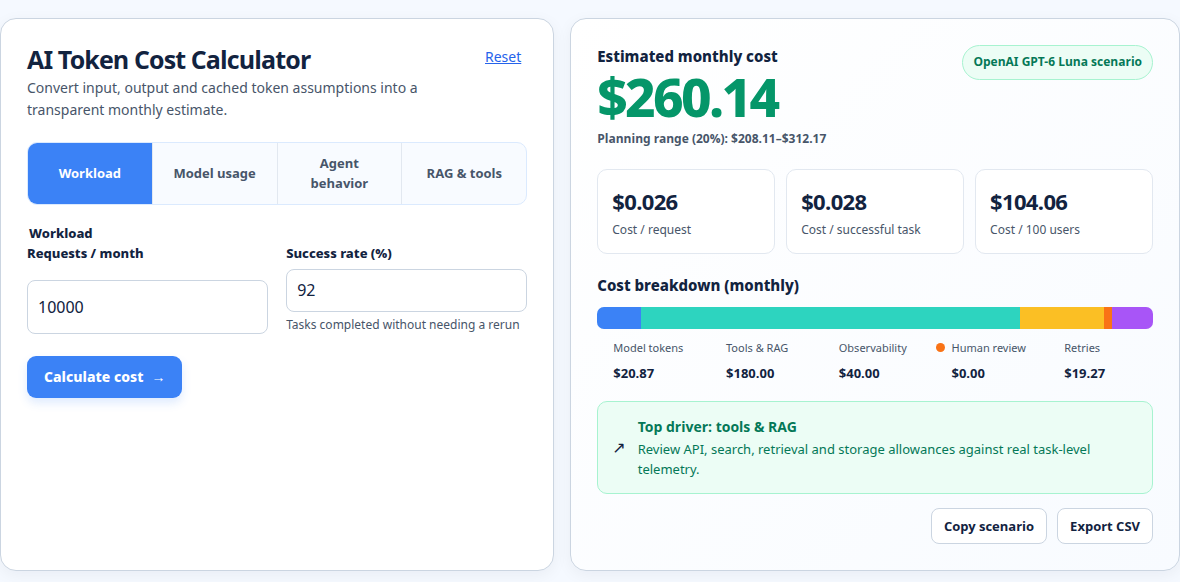
The screenshot demonstrates the related calculator workflow: put the token assumptions and workload into a visible model, inspect the resulting cost breakdown, and preserve the assumptions beside the output. For a single-request audit, the response JSON remains the source of truth; a monthly calculator is useful for scaling the reconciled per-request line across volume, success rate, retries, or other workload assumptions.
Run your scenario
Turn this framework into an editable estimate.
Use dated, source-linked assumptions and see cost per request, successful task and month.
Complete, incomplete, estimated, and reconciled records
Use four labels in a usage ledger so a cheap-looking number is not mistaken for a complete financial record.
Complete means the provider returned a normal completed response and the usage object contains the fields required by your rate card. It can still be an estimate if you used a provisional or historical rate rather than the rate applicable to the invoice period.
Incomplete means the response stopped before the intended answer was finished. OpenAI documents that reaching the context window or max_output_tokens can produce an incomplete response. In that case, the request may have consumed input and reasoning tokens before any visible output appeared. [1] Store the incomplete status and reason. Do not discard the usage record merely because the user saw no useful answer.
Estimated means one or more inputs are assumptions: a forecasted token count, an unconfirmed model snapshot, a planned effort setting, or a rate copied without a checked date. Forecasts should use a range or scenario rather than pretending to be actual invoice data. A visible word count is not a substitute for returned output usage.
Reconciled means the request-level usage has been joined to the correct model, endpoint, rate category, date, and invoice or provider usage export. This is the strongest status for finance reporting. A response-level estimate can be reconciled to a bill, but it should not be called reconciled until the join has been performed.
Why max_output_tokens can surprise you
For reasoning models, max_output_tokens is a total generated-token ceiling. It includes reasoning, visible output, and other non-visible generated tokens. OpenAI recommends leaving headroom because a response can exhaust the limit during reasoning and return little or no visible text. [1] The practical test is to inspect both status and incomplete_details, then compare the total output usage with the configured ceiling.
Suppose an o3 request has 2,000 input tokens and a max_output_tokens value of 2,000. It returns status: incomplete, output_tokens: 2,000, and reasoning_tokens: 1,900, with no usable visible answer. At the same $2.00/M input and $8.00/M output rates, the request-level estimate is $0.0040 + $0.0160 = $0.0200. The absence of a visible answer does not make the output charge zero. Whether you retry is a separate workflow decision; if you do, record the retry as a new attempt rather than overwriting the first usage row.
This is also why a monthly budget should include incomplete attempts and retries. A forecast based only on successful visible answers understates spend when hard tasks sometimes consume most of their output budget before failing to produce a complete response.
Practical reconciliation checklist
- Save the raw response usage and status, including nested details.
- Identify the exact model snapshot and endpoint, not just “OpenAI.”
- Split ordinary input and cached input only when the response and rate card support it.
- Multiply
output_tokensonce by the applicable output rate. - Keep
reasoning_tokensas a diagnostic subfield; never add it tooutput_tokens. - Record whether a visible-output estimate assumes no formatting, tool-call, or other generated tokens.
- Mark incomplete responses and retries as billable attempts when usage is present.
- Date the rate and label computed dollars as estimates until matched to provider usage or an invoice.
For a broader model-by-model rate comparison, see Model pricing comparison. If you are estimating recurring volume rather than one request, use the LLM cost calculator. When response rows and provider exports must be joined for finance review, use the AI API invoice reconciliation calculator.
FAQ
Are reasoning tokens charged separately from output tokens?
No. For OpenAI reasoning models, reasoning tokens are included in output usage and billed using the model's output-token rate. Treat the nested reasoning count as a breakdown for analysis. Adding it to output_tokens would double-count the same generated work. [1] [2]
Can I calculate the bill from the visible answer length?
Not reliably. Visible text can omit reasoning and other generated structure. Use the returned output_tokens for post-request accounting. Before a request, use a token-counting endpoint for the input payload, then model output and reasoning as an uncertain forecast. [3]
What does output_tokens_details.reasoning_tokens tell me?
It tells you how many of the reported output tokens were attributed to reasoning in the response usage details. Subtracting it from output_tokens can produce a useful non-reasoning generated-token diagnostic, but the remainder is not guaranteed to be only visible prose because formatting and tool-call tokens may also be present. [1] [3]
If a response is incomplete, do I still pay for reasoning?
If the provider reports usage for the attempt, treat that usage as billable in your ledger. OpenAI documents that a token limit can be reached during reasoning before visible output is produced, and the response can carry an incomplete status. Capture the usage and incomplete reason rather than assuming an empty answer was free. [1]
Do model rates stay the same across endpoints and processing modes?
Not necessarily. Check the dated OpenAI pricing table for the exact model, context category, processing mode, cached-input eligibility, and any other rate dimensions relevant to the request. The rates used in the worked example are a checked-date illustration, not a permanent price promise. [4]
Primary sources checked
Pricing and product behavior can change. These sources support the time-sensitive claims in this guide; verify current provider terms before committing spend.