Research-backed calculator guide
OpenRouter Auto Router cost tiers: decide how much model choice to delegate
Learn what OpenRouter Auto Router cost tiers mean, how to estimate a routed workload, and how allowed models and provider limits change the bill.
Quick answer
An OpenRouter Auto Router cost tier is a routing preference, not a published dollar rate. The current Auto Router accepts low, medium, high, xhigh, and max; low favors the cheapest capable candidates for the prompt, while max favors the most capable candidates regardless of price. If you omit the setting, OpenRouter says the request behaves roughly like the low band. The selected model still determines the bill, and OpenRouter states that Auto Router adds no separate surcharge. [1]
The practical way to budget it is to estimate the model that may be selected inside a tier, rather than multiplying requests by a “low” or “high” price. Start with input tokens, output tokens, and any per-request or modality charges. Then test how the estimate changes when you move the tier, restrict allowed_models, apply provider limits, or add retries. Record the model returned in the response and compare the estimate with actual usage. The endpoint’s response includes the model that handled the request. [1] [2]
What the cost tiers actually control
OpenRouter’s Auto Router first classifies a prompt into a task type, such as coding, research, math, customer support, or multi-step planning. It then looks at aggregate community spend for that task over a trailing seven-day window, applies the requested cost band, and ranks the remaining candidates by market spend share. It also builds fallbacks after applying account and request restrictions. That means the same tier can select different models for two different tasks, and a tier can change as the market and model catalogue change. [1]
The five settings are best read as a quality-and-spend policy:
low: prefer the cheapest capable band for the task. It is the natural starting point for broad, mixed workloads where cost matters more than always selecting a frontier model.medium: move the candidate band upward when low-tier quality is not sufficient, while still delegating the exact model choice.high: allow a more capable and usually more expensive band for prompts with higher quality requirements.xhigh: make a stronger quality trade-off in favor of expensive candidates.max: favor the most capable candidates in the available band, even when price is secondary.
These labels are not a five-row price sheet. The documentation says a tier is a band, not a ceiling: models cheaper than the selected band can be excluded as well as models above it. Within the band, candidates are still ranked by market spend share. Therefore, “low” does not mean “the cheapest model in the catalogue,” and “max” does not mean one permanently named model. [1]
The model catalogue exposes pricing fields in U.S. dollars per token, request, or unit. Input and output prices can differ, and a model can also have image, web-search, internal-reasoning, cache-read, or cache-write charges. Some entries have conditional overrides such as long-context or time-window pricing. Those fields are why a cost-tier estimate needs a rate snapshot and explicit assumptions instead of a single generic multiplier. [5]
A cost-tier planning method
Use this sequence for a forecast or a budget review.
1. Define the request mix
Separate traffic by task type if your application has materially different prompts. For example, customer-support answers, code debugging, and agent planning should not be assumed to have the same selected-model distribution. For each slice, record requests per month, average input tokens, average output tokens, and the percentage of requests with tools, images, web search, or extended reasoning.
Do not confuse a request with a completed task. If your workflow sends four model calls per user task, model the four calls. If an error causes a retry or a model fallback, decide whether the additional attempt is included in your request count. The OpenRouter model page also warns that tokenization varies by model, so a token estimate made with one tokenizer is an approximation when Auto Router can choose another model. [5]
2. Choose a tier policy, not a price
Start with low for a cost-sensitive baseline and create one scenario for each tier that is operationally plausible. If a quality review says the low scenario is not acceptable, move upward and measure the quality change. Do not claim that medium costs a fixed percentage more than low; the candidate models and their rates are dynamic.
For a regulated or provider-specific workload, combine the tier with allowed_models, such as a provider-family wildcard or an exact model identifier. The router applies those restrictions before selecting the surviving candidate. You can also use excluded_models to remove a family or endpoint. If the restrictions leave no eligible model, the request can fail rather than silently violating the policy. [1]
3. Add provider constraints separately
Model selection and provider selection are different decisions. Once a model is selected, OpenRouter can choose among providers using measured price, throughput, latency, reliability, rate limits, and quality signals. The provider object can allow or deny fallbacks, restrict providers, require zero data retention, sort by price or throughput, or set a max_price object for the provider endpoint. These controls can reduce the candidate pool or change the practical cost and availability of a routed request. [4]
Keep the distinction visible in a budget sheet. A cost tier answers “which model band may answer this task?” A provider policy answers “which endpoint may serve that model?” A provider price ceiling is not the same as an Auto Router cost tier.
4. Reconcile the selected model
Log the response model, usage token counts, request outcome, and any applicable unit charges. Compare the realized cost with the scenario estimate by task slice and tier. OpenRouter’s FAQ says usage is deducted from credits using the underlying model and provider pricing, while the model page describes the pricing fields used to represent those units. [3] [5]
A single month of observed traffic is not proof that a tier has a permanent price. It is an observation of a moving candidate pool. Re-run the rate snapshot when the model catalogue, routing policy, prompt mix, or provider restrictions change.
Worked cost example
Suppose a text-only support application sends 100,000 requests in one month through openrouter/auto. For a planning scenario, assume the selected candidates in a chosen tier average 1,500 input tokens and 400 output tokens per request. Use an illustrative rate of $0.75 per million input tokens and $3.00 per million output tokens. These rates are assumptions for the worksheet, not a vendor quote and not a claim about the current rate of any particular model.
| Step | Assumption or input | Calculation | Output |
|---|---|---|---|
| Monthly requests | 100,000 requests | — | 100,000 |
| Input volume | 1,500 tokens/request | 100,000 × 1,500 | 150,000,000 tokens |
| Output volume | 400 tokens/request | 100,000 × 400 | 40,000,000 tokens |
| Input charge | $0.75/M input tokens | 150 × $0.75 | $112.50 |
| Output charge | $3.00/M output tokens | 40 × $3.00 | $120.00 |
| Model pass-through estimate | Input + output | $112.50 + $120.00 | $232.50 |
| Average cost/request | Model estimate ÷ requests | $232.50 ÷ 100,000 | $0.002325 |
The example assumes no image, web-search, reasoning, cache, or fixed request charge; no retry; no fallback attempt that completes; no BYOK fee; and no separate credit-purchase fee. Under those assumptions, the estimated model usage is $232.50 for the month. OpenRouter says there is no additional Auto Router fee, but purchasing credits and using BYOK can introduce separate account economics, so those items must be added when they apply. [1] [3]
If the same traffic moves from low to high, do not multiply $232.50 by an invented tier premium. Replace the assumed model-rate row with a dated observation or scenario range for the models permitted in the high band. If allowed_models narrows the pool to one provider family, use that family’s current model records and include the chance that a restriction changes fallback behavior. If the provider object has max_price, confirm that the limit is expressed in the units the provider documentation describes; the routing docs give prompt and completion examples per million tokens. [4]
For a larger estimate, add scenario rows rather than hiding uncertainty in one average. For example, use a low-tier scenario at $0.75/$3.00 per million, a high-tier scenario at an assumed $2.00/$8.00, and a max-tier scenario at an assumed $5.00/$15.00. Label all three as planning assumptions until actual response-model and usage data replace them. This is a sensitivity analysis, not a claim that OpenRouter publishes those tier rates.
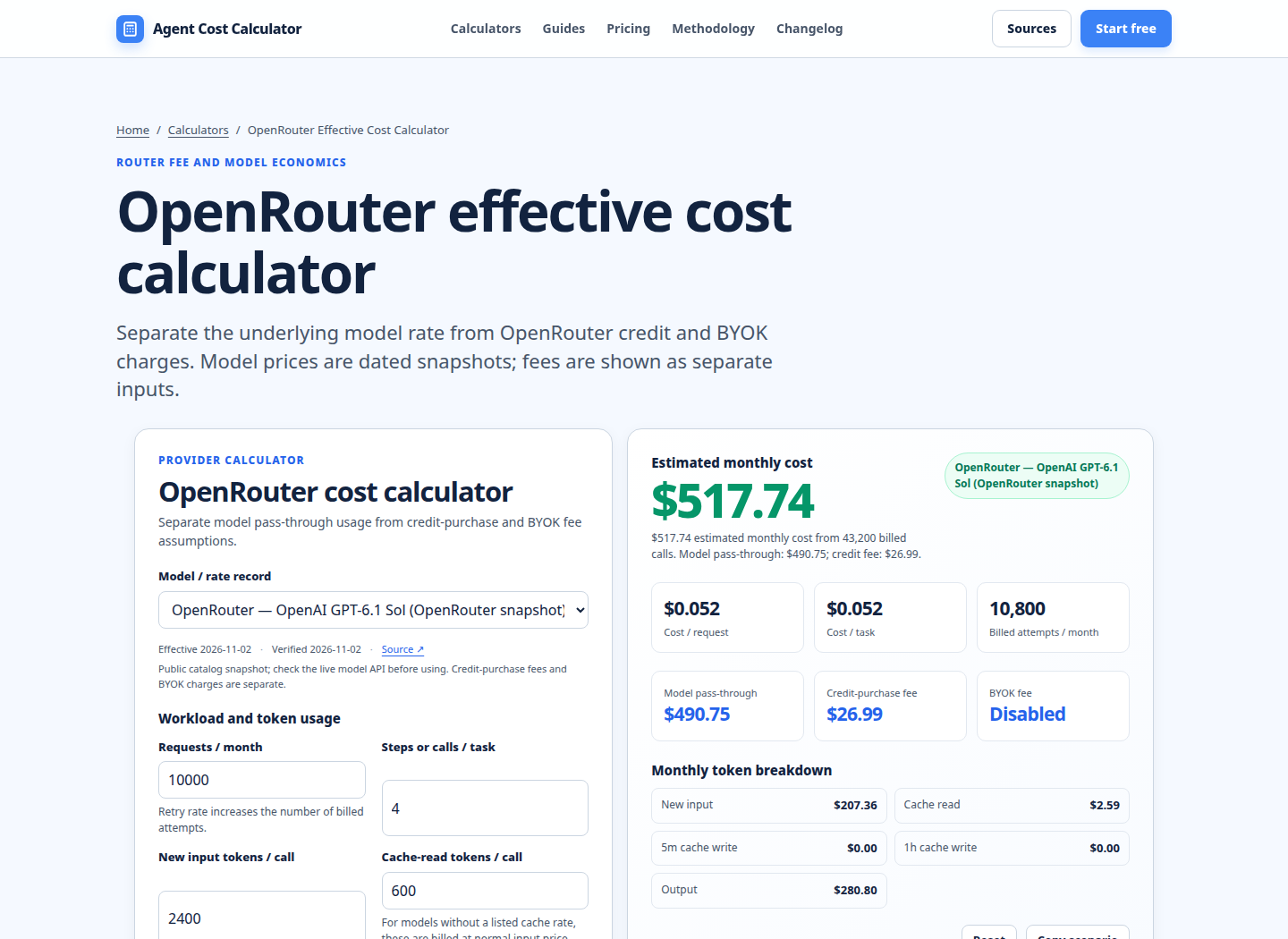
The screenshot shows the useful separation to preserve in your own worksheet: model pass-through usage, token inputs, credit-purchase assumptions, and the resulting monthly total. It is a genuine existing calculator view, not a screenshot of the Auto Router’s internal candidate list. Use the Model pricing comparison calculator to compare dated model-rate assumptions, then use the LLM cost calculator when the workload needs a broader request-and-token model.
When to use allowed models or a fixed model instead
Auto Router is a good fit when prompts vary and you do not want to maintain a model decision tree for every task. It can follow task-specific market signals and return the actual selected model in the response. It is less appropriate when a contract, evaluation, data policy, or reproducibility requirement requires one named model.
Use allowed_models when delegation is useful but the candidate universe needs a hard boundary. A wildcard such as anthropic/* expresses a provider-family policy, while an exact identifier expresses a narrower policy. Pair it with excluded_models when a known endpoint must not run. Remember that the plugin id must match the router slug: auto-router settings apply to openrouter/auto; the beta slug uses its own plugin id. A mismatched plugin can be accepted while the setting is silently ignored. [1]
Use an explicit model when you need deterministic model selection and a separate provider policy when you need deterministic provider selection. OpenRouter’s provider-routing documentation describes order and allow_fallbacks for a fixed provider sequence, while the model-routing explainer distinguishes model fallback from provider fallback. [4]
For invoice review, keep the estimate and actual together. The AI API invoice reconciliation calculator can help map provider or gateway records back to the assumptions used in the forecast. This matters because a tier decision can change the selected model distribution without changing the visible request count.
Run your scenario
Turn this framework into an editable estimate.
Use dated, source-linked assumptions and see cost per request, successful task and month.
Limitations and assumptions
This guide is checked on 2026-11-02. Auto Router candidates, model prices, market-spend rankings, provider availability, and account settings can change after that date. The five tier names should be treated as policy labels, not stable prices. The worked example is intentionally synthetic and uses USD per million tokens, while OpenRouter’s catalogue represents prices at per-token, per-request, or other unit levels.
The estimate excludes taxes, currency conversion, credit-purchase fees, BYOK charges, provider-specific surcharges, abandoned streams, tool or web-search units, image inputs, cache effects, and any application-side orchestration cost unless explicitly added. It also assumes average token counts. P95 or bursty traffic can produce a different bill, especially when long prompts, retries, or task shifts change the selected model. Validate the model, usage, and cost fields returned by real requests before setting a hard budget.
FAQ
Is OpenRouter Auto Router free to use?
There is no separate Auto Router surcharge. You still pay the standard underlying rate for whichever model is selected, and your account may have credit-purchase or BYOK economics that are separate from inference pricing. Treat “no router fee” as “no extra router line item,” not as free inference. [1] [3]
Does low mean the cheapest model available?
No. low favors the cheapest capable band for the prompt’s task. The documentation describes each tier as a band, so the router is not simply sorting the entire catalogue from cheapest to most expensive. A model outside the selected band can be excluded even if it is cheaper, and market-spend ranking still influences the surviving candidates. [1]
Does max guarantee the best model?
No permanent guarantee follows from the label. max favors the most capable candidates in its band, but the candidate pool changes with task classification, market signals, model availability, restrictions, and provider policies. Record the response’s model field and evaluate the quality and cost of your own workload rather than treating max as a universal quality promise. [1] [4]
Can I cap an Auto Router request’s cost?
You can combine model-level routing controls with provider-level controls such as provider.max_price, but they solve different problems. cost_tier chooses a model cost band; max_price filters provider endpoints for the resolved model. Add allowed_models or exclusions when the candidate model family itself needs a boundary. Test the interaction because a restrictive policy can leave no eligible candidate. [1] [4]
Why did two requests with the same tier cost different amounts?
The task type, selected model, provider endpoint, input and output token counts, cache status, and optional units may differ. Auto Router can select a different model on a later turn, and the market signal changes over time. Compare response model and usage fields, not just the tier name. For a conversation that needs continuity, review the documented session behavior and verify the selected model on each response. [1] [5]
Should I budget by requests or tokens?
Budget both. Requests determine how many opportunities there are for model calls, retries, and fixed request units. Input and output tokens determine the main text charge, and images, web search, reasoning, and caching can add their own meters. A request-only budget hides the cost difference between a 200-token answer and a 4,000-token answer.
Primary sources checked
Pricing and product behavior can change. These sources support the time-sensitive claims in this guide; verify current provider terms before committing spend.