Research-backed calculator guide
Prompt Token Calculator: Exact Counts, Estimates and API Cost
Learn how prompt token calculators count text, estimate API cost, and reconcile browser estimates with exact provider usage, with formulas, examples, and optimization steps.
Quick answer
A prompt token calculator converts your prompt into the text units an AI model processes, then applies a model’s input-token price to estimate API cost. It is useful for sizing a prompt, checking context-window headroom, and comparing possible spend before you send a request.
The important qualification is that a pasted-text count is not automatically the exact number that an API bills. Exact usage depends on the target model, tokenizer, message format, system instructions, tools, files, images, caching, and—on some models—reasoning tokens. A calculator gives an exact count only for the tokenizer and payload it actually represents. For a production request, the provider’s count or returned usage object is the final source of truth. OpenAI makes the same distinction: a plain-text tokenizer is helpful, but complete requests can add formatting, tools, images, and files. [1] [3]
What a prompt token calculator measures
A token is a piece of text chosen by a model’s tokenizer. It may be a character, part of a word, a complete common word, whitespace-adjacent text, punctuation, or a fragment of code. “Token” is therefore not a synonym for “word.” The same sentence can produce different counts when the model, encoding, language, capitalization, or surrounding text changes. [1]
A browser calculator commonly reports four related measurements:
- Tokens: the estimated number of model text units in the pasted input.
- Words: a familiar editorial measure that helps you judge prompt length, but does not determine billing.
- Characters: useful for quick sizing and rough heuristics, especially for ordinary English prose.
- Estimated cost: the token count multiplied by a selected input rate, usually expressed per million tokens.
A prompt token counter normally measures only the text you provide. It may not include the hidden or structured parts of a real request. Depending on the API, those parts include system or developer instructions, role labels, conversation history, function schemas, tool definitions, image tokens, file contents, and formatting wrappers. Google similarly documents separate input, output, thinking, cached, and tool-use usage fields for Gemini interactions. [6]
Exact count versus estimate
There are three levels of confidence to keep separate:
- Character heuristic:
characters ÷ 4is a rough starting point for common English. OpenAI describes approximately four characters per token, and Google gives a similar approximation for Gemini, but both present it as an estimate. [1] [2] [6] - Reference tokenizer count: a calculator runs a tokenizer or counting method against pasted text. This is much more informative than a character rule, but it may not be the target model’s tokenizer.
- Request-level count: the provider counts the exact model and payload you will send. This is the most reliable preflight number. For example, OpenAI’s input-token counting endpoint accepts the same style of input as the Responses API, including messages, images, files, tools, and conversations, and returns the input count the model will receive. [3]
Two calculators can therefore disagree without either being broken: they may use different encodings, whitespace rules, or payloads. Anthropic also notes that newer Claude model families can produce materially more tokens for the same text because they use a newer tokenizer. [5]
The prompt token cost formula
For a simple text-only request with no caching, the planning formula is:
input cost = input tokens ÷ 1,000,000 × input price per 1M tokensFor a fuller estimate, separate each billable category:
total request cost =
  (uncached input tokens ÷ 1,000,000 × uncached input rate)
+ (cached input tokens ÷ 1,000,000 × cached input rate)
+ (output tokens ÷ 1,000,000 × output rate)
+ tool, image, audio, search, or other request charges
To estimate a monthly budget:
monthly cost = cost per request × requests per monthPrices are normally quoted per million tokens, so divide by 1,000,000 before multiplying. Do not divide by 1,000 or treat input and output as one blended rate. Providers often price input, cached input, and output differently. OpenAI’s current pricing page, for example, lists separate rates for input, cached input, and output, and notes that processing modes and long contexts can change the applicable rate. [4]
Worked example: from prompt count to API cost
Assume a final request contains 2,400 input tokens and the model returns 600 output tokens. For a transparent illustration, use a model price of $2 per million input tokens and $10 per million output tokens, matching a rate pair listed for one current OpenAI model at the time of writing. Always recheck the provider’s pricing page before using a live budget. [4]
Input cost:
2,400 ÷ 1,000,000 × $2 = $0.0048Output cost:
600 ÷ 1,000,000 × $10 = $0.0060Estimated total:
$0.0048 + $0.0060 = $0.0108 per requestAt 10,000 identical requests, the simple projection is $108. This is not a forecast of actual usage. It assumes every request has the same input, every response has exactly 600 billable output tokens, no caching or batch discount applies, and no extra tools or modalities are billed.
Now suppose 1,800 of the 2,400 input tokens are cache hits, priced at $0.10 per million, while the remaining 600 input tokens are uncached at $2 per million. The revised calculation is:
cached input:   1,800 ÷ 1,000,000 × $0.10 = $0.00018
uncached input:   600 ÷ 1,000,000 × $2.00 = $0.00120
output:           600 ÷ 1,000,000 × $10.00 = $0.00600
estimated total:                                $0.00738
The saving comes from the pricing category, not from reducing the visible prompt. Whether caching works this way depends on the provider, model, cache rules, and whether the repeated prefix qualifies. Treat the example as a method for doing the arithmetic, not as a universal rate card.
Assumptions and exclusions
A useful calculator should state what it does not know. Unless you provide the complete API payload and exact model tokenizer, a browser result usually assumes that pasted text is the full input, its reference tokenizer is a reasonable proxy, its displayed price applies to your service tier, output is entered separately, and no cache, batch, regional, tax, account-credit, tool, retrieval, file, image, audio, or video charge applies.
A count of the words in a prompt does not count the answer. Likewise, a model’s maximum output setting is a ceiling, not a promise that the model will generate that many tokens. Reasoning models may use internal reasoning tokens that are not visible in the final response but still appear in usage and can be billed as output. [1] [3]
Common prompt-token mistakes
Treating one token-to-word ratio as a law
“Four characters per token” is a planning shortcut for common English, not a tokenizer. Code, minified JSON, URLs, identifiers, emojis, mixed scripts, and some languages can produce very different ratios. Use a real tokenizer or provider count for important limits.
Counting only the last user message
A chat request may resend system instructions and earlier turns on every call. Count the complete conversation or use the provider’s request-level counter. A short new question can still be expensive when attached to a large history.
Ignoring roles, tools, and schemas
A function definition or JSON schema is input. So are system instructions and tool descriptions. OpenAI specifically warns that message structure, tools, schemas, images, and files can change the full input count. [1] [3]
Pricing input but forgetting output
Many estimates stop after multiplying prompt tokens by the input rate. In a generation API, output is a second billable category and may be priced higher. Include a realistic output budget or use observed output usage from representative calls.
Calling an estimate “exact” across providers
A count can be exact for one tokenizer and still be an estimate for another model. Label results clearly: exact for the selected encoding, estimated for cross-model cost planning, and reconciled only after the API returns usage.
Using stale prices
Model names, rates, caching rules, and retired models change. Store the date and source of a rate used in a budget. Recheck the provider’s official pricing page before launch or procurement approval. The methodology page explains how to keep calculator assumptions and sources explicit.
Practical optimization and reconciliation steps
- Freeze the payload. Count the actual system instructions, user content, history, schemas, and attachments you intend to send. Do not count a polished prompt in a document while the application sends a longer template.
- Count before sending. Use the calculator for a fast text estimate. If the request is near a context limit or includes tools and files, use the provider’s request-level counting endpoint where available. OpenAI’s counter accepts the same input shape as its Responses API, and Gemini provides
count_tokensfor input-only preflight checks. [3] [6] - Reserve output headroom. Subtract the expected output budget from the model’s context allowance. For reasoning models, leave additional room for non-visible reasoning and structural tokens.
- Reduce repeated context. Remove duplicated instructions, old conversation turns, and verbose examples that do not change the answer. Prefer a compact, stable instruction block and retrieve only the relevant document passages.
- Use caching deliberately. Keep stable prefixes stable when a provider supports prompt caching. Verify cache-hit counts and cache pricing in usage data rather than assuming every repeated token is discounted.
- Measure real calls. Log model, request category, input tokens, cached tokens, output tokens, reasoning or thought tokens where exposed, latency, and estimated cost. Compare the logged usage with the preflight estimate.
- Reconcile the bill. Multiply each usage category by the rate that applied on the request date, then compare the result with the provider dashboard or invoice. Investigate differences caused by retries, multiple completions, tools, batch processing, regional routing, or rounding.
The goal is not minimum length. Remove tokens that add no value while keeping context that improves accuracy; a smaller prompt that causes retries can cost more than a slightly longer prompt that succeeds first time.
FAQ
Is a prompt token calculator accurate?
It is accurate for the tokenizer and text payload it actually counts. It is an estimate of billed usage when the live request adds roles, tools, files, images, cached tokens, or a different model tokenizer. For high-stakes limits, use the provider’s request-level counter and then verify returned usage.
How many words are 1,000 tokens?
For ordinary English, 1,000 tokens is often roughly 750 words, but this is only a rule of thumb. OpenAI describes one token as approximately three-quarters of an English word, while Google gives a broader estimate of 60–80 English words per 100 tokens. Code, punctuation, and other languages can change the ratio. [1] [6]
Do prompt tokens include the AI’s answer?
No. Prompt or input tokens are what you send. Output or completion tokens are what the model generates. Cost estimates should calculate both when the API bills both categories. Reasoning or thought tokens can be included in output usage even when they are not visible in the answer. [1] [3] [6]
Why does my calculator disagree with the API?
The calculator may count pasted text with a reference tokenizer, while the API counts a structured request. Differences commonly come from system messages, conversation history, tool schemas, images, files, caching, model-specific tokenization, or hidden formatting. Compare the exact payload and the provider’s usage fields rather than comparing only the visible prompt.
Can a token calculator predict my monthly bill?
It can produce a scenario estimate. Multiply each request category by its current rate and expected volume, then add output, cache, tool, and modality assumptions. A monthly projection is only as good as its request-volume and output-length assumptions, so update it with observed usage after launch.
Use the calculator before you ship
Paste the final prompt into the prompt token calculator, inspect the count, and test the cost under the model and request pattern you expect. When the result is close to a context limit, validate the complete payload with the provider. When the estimate is too high, shorten repeated context, cache stable prefixes where supported, or route simple tasks to a less expensive model without sacrificing the required quality.
Run your scenario
Turn this framework into an editable estimate.
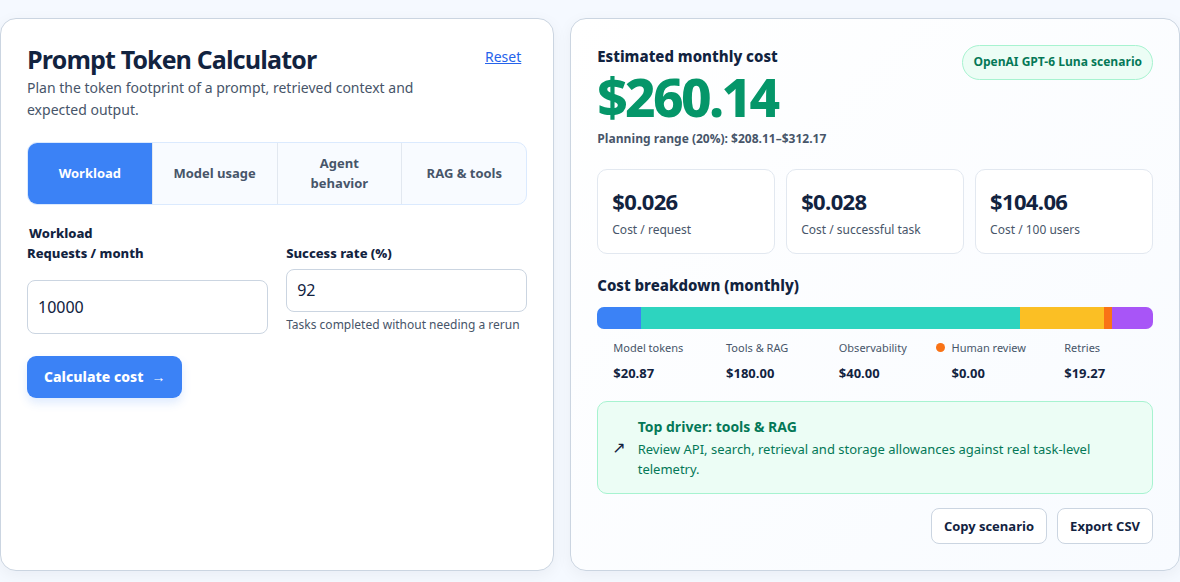
Use dated, source-linked assumptions and see cost per request, successful task and month.
Related internal tools
- AI token cost calculator for comparing input, output, and caching assumptions.
- OpenAI API pricing calculator for OpenAI-specific rate scenarios.
- LLM cost calculator for request-volume and monthly budget planning.
- Prompt token calculator for a quick pasted-text count.
- Methodology for calculator definitions, assumptions, and source handling.
About the Author
About the Author: Zunair Ali Syed is a doctoral researcher in Management Sciences at Minhaj University Lahore and a research consultant with experience in academic research and editing since 2011. He runs QuickEduHelp, with professional interests in digital learning, research methods, and evidence-based academic support.
Primary sources checked
Pricing and product behavior can change. These sources support the time-sensitive claims in this guide; verify current provider terms before committing spend.