Research-backed calculator guide
AI Agent Budget Guardrails: P95 Spend, Headroom and Enforcement Lag
Calculate an AI agent budget guardrail from measured P95 task spend, reserve headroom for in-flight work and queued retries, and account for enforcement lag without treating an estimate as a hard cap.
Quick answer
An AI agent budget guardrail should start with observed end-to-end task cost, not a token average. Calculate expected spend as monthly tasks multiplied by measured average cost per task. Then model a P95 scenario, reserve for work already in flight, add queued retries that can still run, and compare the protected envelope with the approved budget:
Expected spend = tasks × average cost per task P95 scenario cost = tasks × average cost per task × P95 multiplier Enforcement-lag reserve = in-flight work + queued retries Headroom = budget − P95 scenario cost − enforcement-lag reserve
The P95 multiplier is valid as a measured distribution only when it comes from production task-level traces. If it is a planning assumption, label it as scenario math. It is not a statistical forecast, an automatic hard cap, or a guarantee that spend cannot exceed the result.
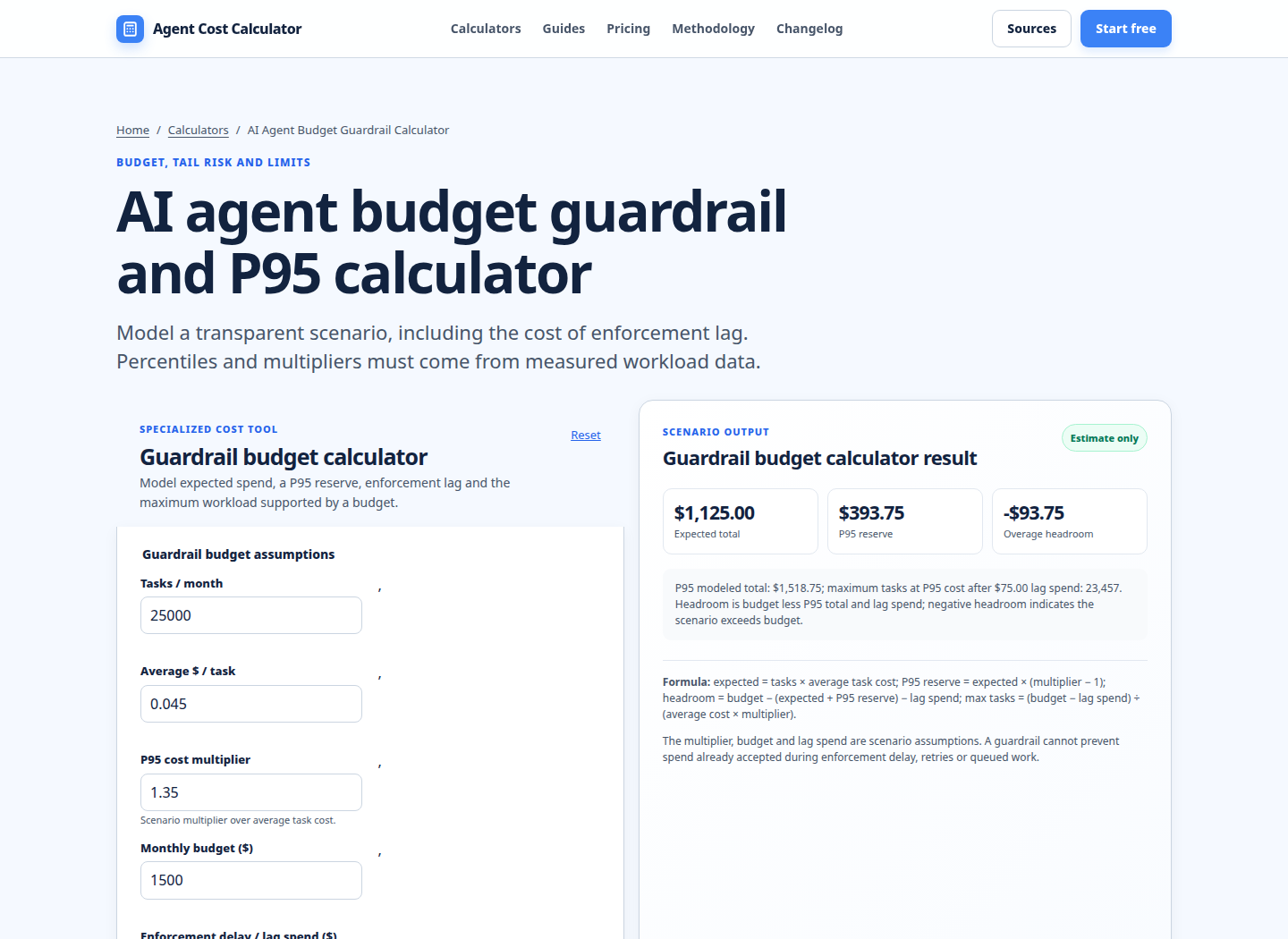
Use the AI Agent Budget Guardrail Calculator to test the inputs and see the remaining headroom. Keep the result alongside a policy that defines alert thresholds, retry limits, queued-work behavior, and the action taken when the threshold is reached.
What the current results cover—and the gap
A dated, locale-limited Google snapshot taken on 2 November 2026 returned ten organic pages for this query family. Most were long-form explainers on runtime budgets, production deployment, security guardrails, cost control, or workflow economics. One was implementation documentation; several used a calculator, template, or business-case format rather than an interactive spend-control model.
Nine of the ten carried a 2026 date and one was from December 2025. Formats included diagrams, editorial images, tables, code examples, and worksheets. Common advice covered monthly caps, per-session limits, model routing, tool-call limits, human approval, dashboards, and cost per completed decision.
The supportable gap is specific: the sampled pages do not combine a measured P95 task-cost distribution with a tail reserve, in-flight calls, queued retries, and threshold-to-enforcement delay in one transparent calculation. This guide addresses that budgeting decision. It makes no global ranking claim; the snapshot is limited by date, location, device, query wording, and returned results.
Average spend is not P95 spend
Average cost is useful for forecasting ordinary volume. It is unsafe as the only guardrail because agent work is variable. A task can make several model calls, retrieve more context, call a paid tool, retry a timeout, or escalate to a human. OpenAI documents separate request and token dimensions such as RPM, RPD, TPM, and TPD, and notes that limits vary by model and can apply at organization or project level [1]. Those are throughput controls, not a distribution of end-to-end task cost.
Measure the unit that the budget owner actually funds. For an agent, that is usually a completed task or attempted task, including every model call, tool meter, retrieval charge, retry, and allocated runtime cost. Store the task cost with a trace or run identifier. From a representative window, calculate the average and the P95. If the workload has changed, segment by workflow, model route, customer tier, or task size instead of blending unlike runs.
Let Cavg be average end-to-end cost and m95 be the measured ratio P95 / Cavg. Then:
C95 = Cavg × m95
If logs show Cavg = $0.12 and P95 task cost is $0.192, the multiplier is 1.6. That is a measured relationship for that population and period. If you simply choose 1.6 because it feels conservative, it is a scenario multiplier, not measured P95 evidence.
Do not call monthly tasks × C95 the statistical P95 of monthly spend. It is a conservative all-tasks-at-P95 scenario. A true monthly P95 needs aggregate daily or monthly observations; the scenario is useful because it makes the tail assumption visible.
Headroom needs a reserve, not just an alert
Headroom is the money left after expected or scenario spend and the reserve needed to finish work that has already been admitted. A practical policy has at least three states:
- Normal: expected spend and the P95 scenario remain inside the approved envelope.
- Warning: a threshold is crossed; alert owners, tighten retries, or route new work to a cheaper or narrower path.
- Enforcement: new expensive work is denied, downgraded, paused for approval, or placed in a controlled queue.
The exact percentages are policy choices. An 80% warning and a 100% enforcement threshold can be a starting point, but they are not universal best practice and should be tuned against false stops and observed variance. FinOps guidance treats budgeting as an ongoing process with holdbacks, variance thresholds, and documented exception handling, not as a one-time number [5].
For a simple conservative scenario, calculate the tail reserve as:
Tail reserve = monthly tasks × (C95 − Cavg)
This reserve represents the extra amount required if every task were priced at the modeled P95 instead of the average. It is intentionally cautious. If you have an actual aggregate-spend distribution, use its chosen percentile instead and avoid double-counting a unit-level tail reserve.
Enforcement lag is part of the budget
A threshold is not the same as an instantaneous stop. There can be model calls already accepted by a provider, requests running in parallel, jobs waiting in a queue, retries scheduled by an SDK, or a message already released to a worker. Your application may also need time to update a shared ledger and propagate a policy decision.
OpenAI distinguishes spend alerts from hard spend limits: an alert sends a notification while traffic continues, while a hard limit causes affected API requests to return a 429 error [1]. Its support guidance also says that changes and enforcement are not instantaneous, so recorded spend can slightly exceed the configured amount [2]. That is direct evidence for modeling lag rather than promising a perfect cap.
Cloud billing budgets are even less suitable as a real-time kill switch. AWS says Budgets information is updated up to three times a day, typically 8–12 hours after the previous update, and warns that charges can continue after a notification threshold is crossed [3]. AWS budget actions can apply IAM policies, service-control policies, or resource actions after a threshold, automatically or with approval [4]. Use those tools for account-level governance, but put a fast application-side ledger near the agent execution path when per-run control matters.
A count-based lag reserve is:
Lag reserve = (in-flight calls × P95 call cost) + (queued retries × P95 retry cost)
Alternatively, use burn rate × enforcement delay for the in-flight portion. Do not add both methods for the same calls. Track delay, concurrency, queue depth, and retry policy; a scheduled retry remains a budget claim until canceled or expired.
Worked scenario: a $2,000 monthly envelope
The following is an illustrative scenario, not a provider quote. Assume:
- 10,000 tasks per month.
- Measured average end-to-end cost of
$0.12per task, including model calls, tools, ordinary retries, and allocated observability. - Measured P95 task cost of
$0.192, giving a P95 multiplier of1.6. - A monthly budget of
$2,000. - A 20-second enforcement delay.
- During that delay, one new in-flight model call starts each second, with a P95 cost of
$0.04per call. - Fifteen queued retries can still execute, at a P95 cost of
$0.06each.
Expected spend is:
10,000 × $0.12 = $1,200The conservative P95 scenario is:
10,000 × $0.192 = $1,920The tail reserve above the average is $720 ($1,920 − $1,200). The in-flight portion of lag costs $0.80 (20 × $0.04). The queued-retry portion costs $0.90 (15 × $0.06). Therefore:
Lag reserve = $0.80 + $0.90 = $1.70 Protected scenario envelope = $1,920 + $1.70 = $1,921.70 Headroom = $2,000 − $1,921.70 = $78.30
The result says the scenario fits, but narrowly. It does not say that the account cannot exceed $2,000. A larger-than-modeled outlier, unpriced tool, provider-side delay, duplicate retry layer, or volume spike can consume the remaining headroom. If the measured aggregate monthly P95 is available, use it in place of the all-tasks-at-P95 scenario. If the queue reserve overlaps with the task-cost data, remove the duplicate component.
Run your scenario
Turn this framework into an editable estimate.
Use dated, source-linked assumptions and see cost per request, successful task and month.
Build the control loop around the estimate
A defensible guardrail is an execution policy, not a spreadsheet cell. Reserve worst-case cost before an expensive step, reconcile it with actual usage afterward, and when headroom is low stop premium work, cap retries, cancel queued jobs, or require approval. Use an idempotency key so a timeout cannot create an untracked duplicate.
Separate controls by failure mode: spend thresholds catch dollars, concurrency limits constrain parallel work, retry and tool-call caps contain loops, and wall-clock deadlines prevent indefinite runs. Alerts should include the workflow, policy version, current and reserved spend, queue depth, and action. Reconcile the ledger with provider usage using the AI Agent Cost Calculator, Invoice Reconciliation Calculator, and LLM Observability Cost Calculator; see methodology for allocation boundaries.
Assumptions and exclusions
This method assumes attributable task costs and measured average, P95, call costs, queue depth, and enforcement delay. It excludes taxes, negotiated discounts, unpriced meters, refunds, credits, and rate changes unless entered explicitly. Recheck provider terms, quotas, model behavior, and SDK retry defaults before approving a budget.
The calculator is a planning aid, not a guarantee, SLA, or hard-cap promise. Define a fail-safe response to ledger outages: stopping protects spend but may hurt availability; continuing protects the user experience but increases exposure.
FAQ
Is P95 the same as the average multiplied by 1.6?
No. A P95 multiplier is valid when it is calculated from a measured task-cost distribution. Multiplying an average by 1.6 is only scenario math until production data supports the relationship. Recalculate it when workflow steps, model routes, traffic mix, or retry behavior change.
Does a P95 task cost give a P95 monthly budget?
No. Multiplying every task by the P95 unit cost creates a conservative envelope, not the statistical P95 of monthly totals. Use aggregate daily or monthly observations when you need a true monthly percentile.
Should queued retries be included if they have not run yet?
Yes, if they can still execute after the threshold is detected. Reserve their expected or P95 cost, cancel them, or expire them explicitly. Do not count them twice if the measured task-cost distribution already includes those same retries.
Do provider hard spend limits guarantee no overspend?
No. OpenAI documents hard-limit behavior for affected requests, but also notes that enforcement is not instantaneous and recorded spend can slightly exceed the configured amount [2]. In-flight work, accepted requests, and separate meters remain relevant.
Are AWS Budgets suitable for stopping one agent run?
AWS Budgets is useful for account and service governance, alerts, forecasts, and budget actions. AWS says its budget data can lag usage by hours [3]. Use a low-latency application ledger for run-level admission and enforcement, then reconcile it with cloud billing.
What should happen at the warning threshold?
Choose a deterministic action that protects completion quality: alert an owner, stop new parallel work, cap retries, route simple steps to a lower-cost model, narrow tools, or require approval. A warning that has no owner or action is monitoring, not enforcement.
Primary sources checked
Pricing and product behavior can change. These sources support the time-sensitive claims in this guide; verify current provider terms before committing spend.