Research-backed calculator guide
Bulk AI Image Generation Cost: Price a SKU or Content Batch End to End
Calculate bulk AI image generation cost from approved outputs, retries, provider billing units, preparation, review, and realistic batch assumptions.
Quick answer
Bulk AI image generation cost is not simply the advertised price multiplied by the number of images you want to publish. A defensible budget starts with the number of approved images, divides by the expected acceptance rate to estimate generation attempts, applies the provider’s unit price, and then adds preparation and review. For a planning example, 1,000 approved 1K images at an 80% acceptance rate require 1,250 attempts. At a quoted $0.067 per image, generation is $83.75 before prompt input, labor, storage, or tax. A batch rate of $0.034 per image would reduce that generation line to $42.50, but it does not remove review or rejected outputs.
The practical formula is:
Total batch budget = (approved outputs ÷ acceptance rate × provider output cost) + input charges + preparation + review + storage/operations.
That formula answers both “how much does it cost to generate 100 AI images?” and larger SKU-catalogue questions. It also prevents a common mistake: treating 100 successful downloads as 100 billable attempts. If 80% of attempts pass review, 100 approved images require 125 attempts, not 100.
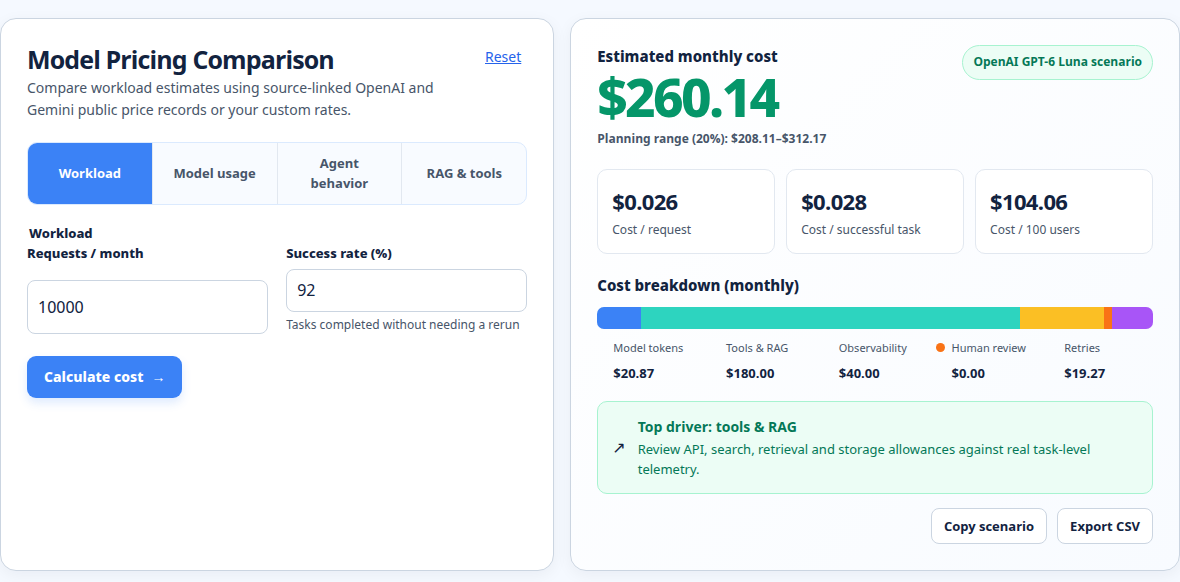
Use the Model pricing comparison calculator to test workload assumptions, then validate the selected provider’s current unit and model price against its own pricing page. Prices and model availability change, so the figures below are planning inputs checked on 2026-11-02, not a promise of a future invoice.
!Model pricing comparison showing workload inputs, planning range, cost breakdown, and retries
What drives bulk image generation pricing?
1. The output unit is different by provider
There is no universal “AI image price.” Google’s Gemini image models are presented with input and output prices per million tokens, alongside equivalent image prices that depend on resolution. For example, the pricing page lists a 1K output for Gemini 3.1 Flash Image at an equivalent $0.067 per image on Standard and $0.034 on Batch, with higher equivalents for 2K and 4K outputs. The same page explains that image output consumes different token counts by resolution. [1]
OpenAI likewise documents image-generation output as token-based. Its current pricing page lists image input and output token rates and directs readers to the image-generation calculator for estimates, rather than presenting one universal image price. [2] The image guide says to use response usage to measure token consumption because model, quality, and size can change the output-token count. [3] In other words, a quote that says “$X per image” is only comparable when model, size, quality, input mode, and billing tier are also stated.
Replicate illustrates another billing pattern. Its public pricing page says many models are billed by hardware time, while some models expose input/output pricing. It lists examples such as Flux at a per-output-image rate and also publishes GPU prices per second. [4] That means a self-managed batch estimate may need a runtime assumption if the chosen model bills by compute time.
Fal’s pricing page shows still another pattern: image models may be billed by image count or by output megapixels, normalized there to 1 megapixel for comparison. Its page notes that higher resolutions are priced proportionally for output-based models, while some models can use GPU-based pricing. [5] A 2K image should therefore not be compared with a 1K image using a bare per-image number.
2. Acceptance yield creates hidden volume
A generated image can be technically complete and still fail your production rule. Product identity, color, text rendering, composition, hands, branding, or consistency across a catalogue may require a rerun. Define acceptance as the share of generated attempts that become publishable outputs.
Use:
expected attempts = approved images ÷ acceptance rate
retries = expected attempts − approved images
For 100 approved images at 80% acceptance, expected attempts are 100 ÷ 0.80 = 125. The 25 extra attempts are not an arbitrary contingency; they are the mathematical consequence of the yield assumption. If acceptance is 95%, the same target needs about 106 attempts. If acceptance is 60%, it needs about 167 attempts, rounded up when you schedule actual jobs.
Measure acceptance on a representative sample before committing to a catalogue. A simple portrait batch may pass at a different rate from a product-image batch with strict shape and label requirements. Do not reuse an acceptance rate from one model, prompt family, or resolution without testing it on the intended SKU set.
3. Fixed capacity can cost more than the marginal rate
A browser tool may sell credits, a monthly plan, or a one-time pack. The relevant question is not only the advertised rate. It is the cash you must pay for the capacity that covers the job, less any credits you can actually use before expiry. A plan that looks cheap per credit can be inefficient if it leaves most credits unused or if a high-quality mode consumes several credits per output.
For an API, the marginal output charge may be easy to multiply, but integration, queues, storage, moderation, image download, and human review still exist. For local or self-hosted inference, add GPU time, idle capacity, electricity, maintenance, and engineering. Keep those cost layers separate so a provider quote is not mistaken for a fully loaded production budget.
A reusable bulk AI image generation cost formula
Start from the deliverable rather than the tool’s marketing volume:
- Approved output target: number of images that must pass review.
- Acceptance rate: estimated share of attempts that become approved assets.
- Expected attempts: target divided by acceptance rate, rounded up for execution.
- Provider output charge: per image, token, megapixel, credit, or compute second.
- Input charge: prompt tokens, reference-image tokens, or other request units.
- Preparation: time to normalize SKU data, write prompts, prepare references, and configure the batch.
- Review: time to inspect every attempt or a defined review sample.
- Operations: storage, transfer, orchestration, monitoring, and any paid tooling.
A compact spreadsheet layout is:
attempts = CEILING(approved / acceptance_rate)
generation = attempts × output_unit_price
input = attempts × input_units_per_attempt × input_unit_price
review = attempts × review_seconds ÷ 3,600 × hourly_review_rate
preparation = SKUs × preparation_minutes ÷ 60 × hourly_preparation_rate
total = generation + input + review + preparation + operations
cost_per_approved = total ÷ approved
If a provider bills in tokens, replace output_unit_price with output tokens per attempt multiplied by the price per token. If it bills by megapixel, multiply the expected output megapixels by the provider’s rate. If it bills by GPU seconds, estimate runtime per attempt and include queue or idle policy where applicable.
Worked cost example: 1,000 approved images
Assume a US-dollar planning budget for a product catalogue with 250 SKUs and four approved images per SKU. The target is 1,000 approved 1K images. The team estimates 80% acceptance, two minutes of preparation per SKU, 15 seconds of review per generated attempt, and a fully loaded review/preparation rate of $30 per hour. These are assumptions, not vendor quotes.
For the provider line, use the Google-published Gemini 3.1 Flash Image equivalent of $0.067 per 1K image on Standard or $0.034 per 1K image on Batch, as displayed on the checked pricing page. [1] Assume 1,000 text input tokens per attempt. The listed input rates are $0.50 per million tokens on Standard and $0.25 per million on Batch for that model family. [1]
| Step | Standard assumption | Batch assumption |
|---|---|---|
| Approved images | 1,000 | 1,000 |
| Acceptance rate | 80% | 80% |
| Expected attempts | 1,000 ÷ 0.80 = 1,250 | 1,000 ÷ 0.80 = 1,250 |
| Output rate | $0.067/image | $0.034/image |
| Generation charge | 1,250 × $0.067 = $83.75 | 1,250 × $0.034 = $42.50 |
| Input tokens | 1,250 × 1,000 = 1.25M | 1.25M |
| Input charge | 1.25M × $0.50/M = $0.625 | 1.25M × $0.25/M = $0.3125 |
| Preparation | 250 × 2 ÷ 60 × $30 = $250.00 | $250.00 |
| Review | 1,250 × 15 ÷ 3,600 × $30 = $156.25 | $156.25 |
| Illustrative subtotal | $490.625 | $449.0625 |
| Cost per approved image | $0.491 | $0.449 |
Rounded to cents, the illustrative subtotal is $490.63 Standard or $449.06 Batch. The difference is driven by the vendor’s output rate; the acceptance, preparation, and review assumptions are unchanged. If your tool charges a subscription or credit minimum, replace the generation line with the cash required to purchase sufficient capacity. If it charges for reference-image inputs, add those tokens separately.
This example also shows why the answer to “what is the cost to generate 100 AI images?” needs a definition. At the same 80% acceptance, 100 approved images need 125 attempts. At $0.067 each, output generation is $8.38 before input and labor. If “100 images” means 100 raw attempts with no review, the output line is $6.70. Both are valid calculations for different jobs; they should not be reported as the same unit.
How to compare models without hiding assumptions
Build a comparison row for every candidate model. Record provider, exact model ID, API or browser route, resolution, quality, input mode, output unit, price date, batch eligibility, and whether failed or moderated requests are billable. Then add a second layer for production yield.
A model with a lower raw output rate can be more expensive per approved asset if its acceptance rate is lower. For two options, calculate:
approved-unit generation cost = output_unit_price ÷ acceptance_rateAt $0.067 and 80% acceptance, output-only cost per approved image is $0.08375. At $0.045 and 60% acceptance, it is $0.075. The second option has the higher raw rate but the lower output-only cost per approved image. Add labor and inputs before making a final choice.
The comparison should also include resolution. A 4K export may be required for print, but it can consume more output tokens or megapixels than a 1K preview. If the workflow creates a 1K draft and upscales only accepted images, model the two stages separately. Do not multiply a 4K rate across every exploratory attempt unless every attempt is truly rendered at 4K.
For token-metered providers, inspect actual usage after a pilot. The OpenAI image-generation guide specifically notes that usage can vary with model, quality, and size, and that Responses API requests can include mainline model token usage in addition to image-generation cost. [3] For compute-metered providers, capture runtime and hardware class from the job records. For credit systems, record the credit burn per setting rather than assuming one credit equals one image.
For broader token or provider comparisons, the AI token cost calculator and LLM Cost Calculator can help separate prompt and output assumptions from the image-production worksheet. The Mistral and Groq API cost calculator is useful when a text model prepares prompts, metadata, or QA alongside the image provider; keep that auxiliary model spend as its own line.
Run your scenario
Turn this framework into an editable estimate.
Use dated, source-linked assumptions and see cost per request, successful task and month.
What this estimate excludes
The worked example excludes storage, CDN delivery, image resizing, background removal, watermark removal, moderation services, prompt-generation models, taxes, commercial-rights premiums, support contracts, and the cost of connecting a browser workflow to a catalogue system. It also assumes no annual commitment, no minimum monthly spend, and no currency conversion fee.
It excludes the value of rejected outputs beyond the acceptance-rate model. If a human reviewer spends longer on difficult images, increase review seconds. If prompts are revised after a failed batch, add another preparation or generation stage. If the provider retries a transient failure automatically, confirm whether that retry is included or billed. If the workflow stores all raw outputs for audit, add storage and retention.
The figures are not a quote from Google, OpenAI, Replicate, or Fal. They are calculations using published unit descriptions and clearly stated assumptions. Google’s pricing page itself says discounts and model availability can change. [1] Recheck the linked provider page before purchase and preserve the model ID, resolution, price tier, and date in your cost ledger.
FAQ
How much does it cost to generate 100 AI images?
It depends on whether 100 means raw attempts or 100 approved images. At a quoted $0.067 per 1K output, 100 raw attempts cost $6.70 in output charges. At an 80% acceptance rate, 100 approved images require 125 attempts, so output generation is $8.38 before input, review, preparation, subscription minimums, and tax. Use the provider’s current rate and your measured acceptance rate rather than a generic industry average.
Is batch generation always cheaper than standard generation?
No. A provider may publish a lower Batch output rate, but batch processing can have slower completion, model or endpoint limits, minimum commitments, or different availability. In the Google example used here, the displayed Batch equivalent is lower than Standard for the same image resolution, but preparation, review, and rejected attempts still cost the same under the stated assumptions. Confirm that your deadline and model support the batch tier.
Should I budget retries for rejected or failed images?
Yes, if your target is approved or publishable output. Divide the target by the expected acceptance rate to estimate attempts. Keep quality rejection separate from infrastructure failure when possible: a rejected composition and a timeout may have different remediation paths and billing behavior. Report the acceptance sample, date, and definition so another person can reproduce the estimate.
Which billing unit is best for comparing image APIs?
Use a normalized approved-image cost, but keep the native unit beside it. Token-metered models need token counts by quality and size. Megapixel-metered models need output dimensions. GPU-time models need runtime and hardware. Credit products need credit burn per setting. A normalized 1K output can be a useful first screen, but it is not a complete quote when resolution, quality, input references, or concurrency changes.
Do subscriptions make bulk generation free after I pay monthly?
No. A subscription converts part of the cost into committed capacity. Calculate the cash required for the plan or pack that covers the batch, then allocate unused capacity honestly. If the plan has credits that expire or different burn rates by model, the effective cost per approved image depends on utilization. Keep subscription capacity, marginal top-ups, and actual generation charges visible as separate budget lines.
What is the biggest mistake in a high-volume AI image budget?
Using the requested image count instead of the approved-output count. A catalogue may ask for 1,000 publishable images but generate 1,250 or more attempts. The second common mistake is reporting only API output charges while omitting preparation and review. A useful budget states what is included, what is excluded, and which assumptions would change the answer.
Primary sources checked
Pricing and product behavior can change. These sources support the time-sensitive claims in this guide; verify current provider terms before committing spend.